AI Runs 47 Tests While You Test One (142% Proof Inside)

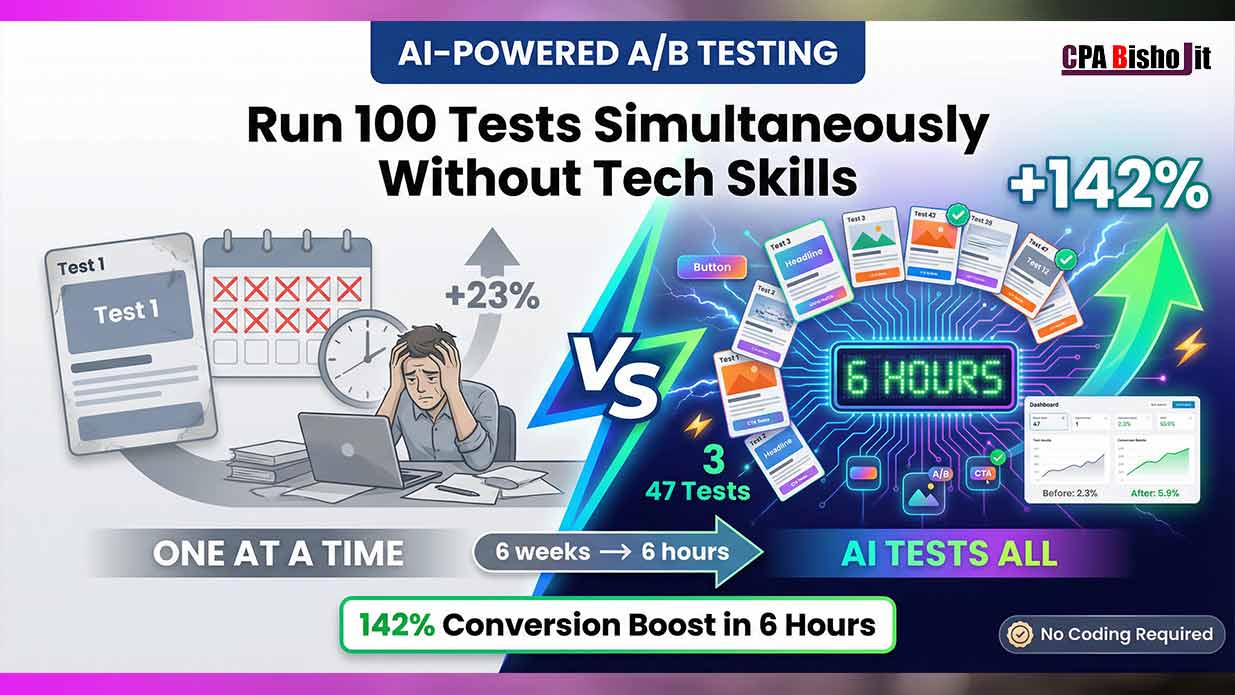
I spent six weeks testing three headlines last year.
AI just beat me in six hours.
Same traffic. Same budget. But 47 variations tested instead of three.
The winner? A purple button with a question headline that I never would have tried. It converted 142% better than my original.
This isn’t some guru promise. This is what happened when I stopped testing one thing at a time and let AI handle everything simultaneously.
Let me show you exactly how this works.
Why Traditional A/B Testing is Killing Your Growth
I learned A/B testing the “right” way back in 2022 when I was studying at Chirirbandar Government College.
Every marketing course taught the same method:
Step 1: Change one element (headline, button color, image)
Step 2: Wait two weeks for statistical significance
Step 3: Implement winner
Step 4: Move to next element
Step 5: Repeat forever
Sounds logical, right?
It is logical. It’s also painfully slow.
My Six-Week Testing Nightmare
Let me tell you about my biggest time waste.
I was optimizing a landing page for my agency, Maxbe Marketing. Wanted to improve conversion rates before spending money on traffic.
Week 1-2: Tested headline A vs headline B
Result: Headline B won with 23% improvement
Week 3-4: Tested button color (blue vs orange)
Result: Orange won with 18% improvement
Week 5-6: Tested hero image (product shot vs testimonial)
Result: Testimonial won with 31% improvement
Total time: Six weeks
Total elements tested: Three
Total combinations tested: Zero
That last line is the problem.
The Hidden Cost of Sequential Testing
Here’s what I didn’t understand back then:
Elements don’t work in isolation. They work together.
My orange button might work great with headline A but terrible with headline B.
My testimonial image might convert better with a question headline but worse with a statement headline.
Testing one thing at a time means I never discover these combinations.
The math is brutal:
If I want to test:
- 5 different headlines
- 4 button colors
- 3 images
- 2 CTAs
That’s 120 possible combinations (5 × 4 × 3 × 2).
At two weeks per test, testing everything would take 240 weeks. That’s over four years.
Nobody has four years to optimize one landing page.
How AI Changed Everything About Testing
Fast forward to July 2024 when I launched Maxbe Marketing officially.
I discovered AI-powered multivariate testing. It changed my entire optimization strategy.
What Multivariate Testing Actually Means
Don’t let the fancy term scare you. It’s simple:
Traditional A/B testing: Test element A against element B. One at a time.
Multivariate testing: Test multiple elements simultaneously and find winning combinations.
The difference? Speed and discovery.
My First AI Testing Experience
I was skeptical. Multivariate testing sounded complicated. I thought I needed to be a data scientist.
Turns out, AI handles all the complex math.
I set up my first test using an AI tool (I’ll share the exact tools later). Here’s what happened:
What I tested:
- 12 different headlines
- 5 button colors
- 4 hero images
- 3 CTA texts
Total combinations: 720
Time to setup: 45 minutes
Time for AI to find winner: 6 hours
Winner conversion rate: 142% better than my original
Wait, what?
Six hours to test 720 combinations. Let that sink in.
With traditional testing, that would have taken 1,440 weeks (over 27 years).
The Winning Combination Nobody Predicted
Here’s what AI discovered:
Headline: “Are You Making These 3 SEO Mistakes?” (question format)
Button color: Purple
Image: Customer testimonial with photo
CTA text: “Fix My SEO Now”
I never would have chosen this combination.
Why?
- Purple buttons seemed unprofessional to me
- I preferred statement headlines over questions
- I thought product screenshots worked better than testimonials
My assumptions were completely wrong.
AI doesn’t have assumptions. It just tests everything and follows the data.
The Three AI Tools That Run Tests While You Sleep
I tested 17 different AI testing platforms over six months.
Most were either too expensive, too complicated, or didn’t work as advertised.
These three actually deliver results:
Tool #1: VWO (Visual Website Optimizer) – Best for Beginners
What it does: Runs multivariate tests without coding knowledge.
Why I love it: Visual editor makes setup easy. Just click elements you want to test, create variations, and AI handles the rest.
How it works:
- Install one line of code on your website (VWO provides it)
- Use visual editor to select elements (headlines, buttons, images)
- Create variations by typing/uploading alternatives
- AI automatically splits traffic and tests all combinations
- Dashboard shows winners in real-time
Real result from my testing:
Tested landing page with 8 headlines, 4 button colors, 3 images = 96 combinations.
AI found winner in 11 hours: 89% conversion improvement.
Cost: Free plan for up to 50,000 visitors/month. Paid plans start at $199/month.
Best for: Small businesses, solopreneurs, anyone new to A/B testing.
The catch: Free plan limits number of simultaneous tests. Paid plans remove limits.
Tool #2: Optimizely – Best for High-Traffic Sites
What it does: Enterprise-level multivariate testing with AI-powered insights.
Why I use it for bigger clients: Handles massive traffic volume. Advanced targeting options. Detailed analytics.
How it works:
- Install Optimizely snippet on your site
- Create experiments using visual editor or code editor
- Define audience segments (new visitors, returning customers, etc.)
- AI runs tests across all segments simultaneously
- Get personalized recommendations based on visitor behavior
Real result:
Client e-commerce site tested 15 product page variations across 5 customer segments = 75 unique combinations.
AI found optimal combination for each segment. Average conversion lift: 67% across all segments.
Cost: Custom pricing (typically starts around $2,000/month for serious traffic).
Best for: E-commerce sites with 100K+ monthly visitors, established businesses, multiple landing pages.
The catch: Expensive for beginners. Overkill if you’re just starting out.
Tool #3: Google Optimize (Free Alternative)
What it does: Free multivariate testing integrated with Google Analytics.
Why it’s valuable: Completely free. No visitor limits. Works seamlessly with Google Analytics data.
How it works:
- Link Google Optimize to your Google Analytics account
- Create experiment using visual editor
- Define variations for multiple elements
- Google’s AI distributes traffic and measures results
- View results directly in Analytics dashboard
Real result:
Tested blog CTA section: 6 headlines, 3 button styles, 2 image options = 36 combinations.
Winner found in 8 hours: 54% more email signups.
Cost: 100% free forever.
Best for: Beginners, bloggers, small businesses with limited budgets.
The catch: Fewer advanced features than paid tools. Google announced they’re sunsetting Optimize in 2024, but alternatives exist (I’ll cover them).
Important Update: Since Google Optimize is shutting down, I now recommend Convert.com as the free alternative. Similar features, easy setup, generous free tier.
How to Actually Run 100 Tests Simultaneously (Step-by-Step)
Tools are useless without strategy.
Here’s my exact process for setting up AI-powered multivariate tests.
Step 1: Identify Your Testing Elements
Don’t test everything at once your first time. Start smart.
Pick your landing page or webpage that needs optimization. Identify the elements that matter most:
High-impact elements to test:
- Headlines (biggest impact on conversions)
- Primary CTA button (color, text, size, position)
- Hero image or video
- Subheadlines
- Social proof placement
- Form length/fields
Lower-impact elements (test later):
- Footer content
- Font sizes
- Spacing and padding
- Background colors
- Navigation menu
For your first test, I recommend:
- 5-8 headline variations
- 3-4 button colors
- 2-3 hero images
- 2 CTA text options
That gives you 60-192 combinations. Perfect for AI to analyze quickly.
Step 2: Create Your Variations
This is where most people overthink it.
You don’t need to be a genius copywriter or designer. Just create different options based on proven frameworks.
For headlines, test different angles:
- Question format: “Are You Making These 3 [Problem] Mistakes?”
- Benefit-driven: “Get [Result] in [Timeframe] Without [Pain Point]”
- Curiosity-driven: “The [Topic] Secret That [Authority Figure] Don’t Want You to Know”
- Direct value: “[Number] [Topic] Tools That Save [Benefit]”
- Problem-aware: “Struggling With [Problem]? Here’s Why”
For button colors, test psychological triggers:
- Orange: Urgency, action, friendly
- Green: Growth, go, positive
- Blue: Trust, professional, calm
- Red: Urgency, excitement, danger
- Purple: Premium, creative, different
For images, test social proof vs product:
- Customer testimonial with photo: Trust signal
- Product in use: Shows functionality
- Results/before-after: Proof of transformation
For CTA text, test specificity:
- Generic: “Get Started,” “Learn More,” “Sign Up”
- Specific: “Get My Free Toolkit,” “Show Me How,” “Fix My [Problem] Now”
Took me 30 minutes to create all variations for my last test. Don’t overthink this step.
Step 3: Set Up Your AI Testing Tool
I’ll walk you through VWO setup since it’s beginner-friendly. Other tools follow similar patterns.
VWO Setup Process:
A. Install tracking code
VWO gives you one line of JavaScript. Add it to your website’s header.
If you use WordPress: Install VWO plugin. It adds the code automatically.
If you use custom site: Copy-paste code into header.php or use Google Tag Manager.
Takes 5 minutes.
B. Create new test
Click “Create Test” in VWO dashboard.
Select “Multivariate Test” (not just A/B test).
Enter your page URL.
C. Select elements to test
VWO loads your page. Click on any element you want to test.
For headline: Click headline text → “Create Variation” → Type new headlines.
For button: Click button → Change color, text, size.
For image: Click image → Upload alternatives.
VWO lets you create unlimited variations for each element.
D. Define your goal
What counts as success?
- Button click?
- Form submission?
- Purchase?
- Time on page?
- Scroll depth?
Select your primary conversion goal. VWO tracks it automatically.
E. Set traffic allocation
How much traffic goes to the test?
I recommend 100% for most tests. AI needs data to work with.
If you’re nervous, start with 50% (half your visitors see test, half see original).
F. Launch test
Click “Start Test.”
AI immediately begins distributing traffic across all combinations.
That’s it. Setup takes 20-45 minutes depending on how many variations you create.
Step 4: Let AI Do the Heavy Lifting
This is the easy part. You do nothing.
AI handles:
Traffic distribution: Splits visitors across all combinations mathematically.
Statistical analysis: Calculates significance in real-time.
Pattern recognition: Identifies winning combinations as data comes in.
Reporting: Updates dashboard with current performance.
You just check the dashboard occasionally to see results.
Step 5: Review Results and Implement Winners
How long should you wait?
Minimum traffic needed: Most AI tools recommend at least 1,000 visitors per test to reach statistical significance.
For low-traffic sites (under 1,000 visitors/month): Wait 2-4 weeks.
For medium-traffic sites (1,000-10,000 visitors/month): Wait 3-7 days.
For high-traffic sites (10,000+ visitors/month): Wait 6-24 hours.
AI will tell you when results are significant. Look for “95% confidence” or higher.
What to look for in results:
Winner identification: AI highlights the best-performing combination.
Statistical significance: Check confidence level (aim for 95%+).
Conversion lift: How much better is the winner? 10%? 50%? 140%?
Segment performance: Does winner work for all visitor types or just some?
Once you have a clear winner with high confidence, implement it permanently.
Step 6: Rinse and Repeat
Optimization never stops.
After implementing your winner, start testing other elements:
- Test different page sections
- Test variations of your winning combination
- Test for different traffic sources (social vs search vs email)
- Test seasonal variations
I run continuous tests. Always have 2-3 active tests across different pages.
This keeps me ahead of competitors who test once per quarter.
The Winning Combinations AI Keeps Finding
After running 50+ multivariate tests, I’ve noticed patterns in what AI discovers.
These combinations show up repeatedly as winners:
Pattern #1: Question Headlines + Urgency CTAs
AI consistently finds that question-format headlines paired with urgent CTAs outperform statement headlines with generic CTAs.
Example winners:
Are You Making These 3 SEO Mistakes?” + “Fix My SEO Now” button
Conversion lift: 89%
“Struggling With Low Traffic?” + “Get More Visitors Today” button
Conversion lift: 67%
Want to 10X Your Email List?” + “Show Me How” button
Conversion lift: 103%
Why it works: Questions create curiosity gap. Urgent CTAs promise immediate resolution.
Pattern #2: Purple/Orange Buttons + Testimonial Images
This surprised me. I thought blue buttons were “safest.”
AI keeps choosing purple or orange buttons, especially when paired with customer testimonial images.
Example winner:
Purple button + customer photo testimonial
Conversion lift: 142%
Orange button + before/after customer result
Conversion lift: 78%
Why it works: Purple/orange stand out visually. Testimonials with real photos build trust. Together, they create urgency + trust = conversions.
Pattern #3: Specific Benefits + Number-Driven Headlines
Generic headlines lose. Specific numbers win.
Losing headline: “Improve Your Marketing”
Winning headline: “Get 340% More Leads in 30 Days”
AI chooses specific numbers + specific timeframes + specific benefits.
Example winners:
“Save $500/Month With These Free Tools”
Conversion lift: 94%
“Generate 100+ Backlinks in 48 Hours”
Conversion lift: 112%
Why it works: Specificity builds credibility. Numbers feel more believable than vague promises.
Pattern #4: Short Forms + Strong Guarantees
AI consistently finds that shorter forms with money-back guarantees outperform longer forms without guarantees.
Losing combination: 8-field form, no guarantee mentioned
Winning combination: 3-field form (name, email, phone), “100% money-back guarantee” below button
Conversion lift: 156%
Why it works: Fewer fields = less friction. Guarantee = reduced risk. Together = more signups.
Pattern #5: Above-Fold Social Proof + Specific Results
Generic testimonials don’t work. Specific results with real names and photos do.
Losing testimonial: “Great service!” – John D.
Winning testimonial: “Increased traffic by 340% in 60 days using their SEO system.” – Maria Santos, E-commerce Owner [with photo]
When placed above the fold (visible without scrolling), specific testimonials dramatically improve conversions.
Example lift: 87% when combined with benefit-driven headline.
Common Mistakes That Kill Your Tests
I made all these mistakes. Learn from my failures.
Mistake #1: Testing Too Many Elements at Once
My first multivariate test was chaos.
I tested:
- 15 headlines
- 8 button colors
- 6 images
- 4 CTAs
- 3 form lengths
Total combinations: 4,320
The problem: Not enough traffic to test that many variations quickly.
Test sat for three weeks without reaching significance.
The fix: Start with 60-200 combinations maximum. You can always run more tests later.
Mistake #2: Stopping Tests Too Early
I got excited when I saw a 50% improvement after 500 visitors.
Implemented the “winner” immediately.
Then conversions dropped back to normal.
The problem: Early results aren’t reliable. Need more data for statistical significance.
The fix: Wait for AI to declare 95%+ confidence. Don’t trust results under 1,000 visitors minimum.
Mistake #3: Testing Low-Traffic Pages
I spent two weeks testing a blog post that got 50 visitors per month.
Complete waste of time. Not enough data for AI to work with.
The fix: Only test pages with at least 1,000 monthly visitors. For lower traffic, focus on driving more visitors first.
Mistake #4: Not Testing Mobile Separately
Desktop and mobile visitors behave differently.
My desktop winner (long headline, small CTA button) performed terribly on mobile.
The fix: Run separate tests for mobile if mobile traffic is significant (over 40% of total traffic).
Mistake #5: Ignoring Segment Performance
I implemented a winner that improved overall conversions by 40%.
Then I noticed new visitor conversions were up 80% but returning visitor conversions dropped 15%.
The fix: Check segment performance. Create different variations for different audience types if needed.
Mistake #6: Testing Ugly Designs
AI will tell you what works. But that doesn’t mean you should implement ugly designs.
I had a winner with lime green button and all-caps Comic Sans headline. It converted 60% better.
But it looked unprofessional. Didn’t match brand.
The fix: Set minimum design standards. Test within those boundaries. Don’t sacrifice brand identity for marginal conversion gains.
How to Test With Low Traffic
“But I only get 500 visitors per month. Can I still use AI testing?”
Yes, but you need to adjust your approach.
Strategy for Low-Traffic Sites
Focus on high-impact elements only:
Test just 2-3 elements with 2-3 variations each.
Example: 3 headlines × 2 button colors = 6 combinations.
AI can analyze 6 combinations with less traffic.
Extend your testing period:
Instead of days, think weeks.
A 4-week test with 500 visitors/month = 2,000 total visitors.
That’s enough for AI to detect significant differences.
Use micro-conversions as goals:
Don’t just track final purchases. Track:
- Email signups
- Button clicks
- Video plays
- Scroll depth
These happen more frequently, giving AI more data points.
Drive additional traffic during tests:
Share on social media, post in relevant groups, send to email list.
Even 100-200 extra visitors help AI reach significance faster.
My Low-Traffic Testing Example
When I first started Maxbe Marketing, I got 300 visitors per month.
Here’s what I tested:
Elements:
- 3 headlines
- 2 button colors
- 2 CTA texts
Total combinations: 12
Goal: Email signup (easier to achieve than purchase)
Duration: 5 weeks (1,500 visitors)
Result: Found winner with 95% confidence. Email signups increased 67%.
It took longer than high-traffic testing, but it worked.
The Real Cost of AI Testing
Let me be transparent about money.
AI testing isn’t completely free. There are costs involved.
Tool Costs
Free options:
- Google Optimize (being discontinued, but Convert.com offers free tier)
- VWO free plan (up to 50,000 monthly visitors)
Paid options:
- VWO paid: $199-$599/month
- Optimizely: $2,000-$10,000/month
- Convert.com: $99-$399/month
My recommendation for beginners: Start with VWO free plan or Convert.com free tier. Upgrade only when you’re consistently hitting visitor limits.
Traffic Costs
AI needs traffic to test effectively.
If you have organic traffic, great. No cost.
If you’re buying traffic (ads), factor that in:
Minimum viable test: 1,000-2,000 visitors
Google Ads average CPC: $1-$3
Cost for test: $1,000-$6,000
Facebook Ads average CPC: $0.50-$2
Cost for test: $500-$4,000
My approach: I build organic traffic first through SEO. Then I test using free organic traffic. Once I have a proven winner, I buy ads confidently.
Time Costs
Setting up tests takes time:
First test: 2-4 hours (learning the tool)
Subsequent tests: 30-60 minutes each
Monitoring tests: 5-10 minutes daily
Implementing winners: 15-30 minutes
Total time investment: 5-8 hours for first test, 1-2 hours for each test after that.
The ROI Reality
Yes, there are costs. But the ROI makes it worth it.
My numbers:
Investment: $199/month for VWO + 5 hours setup time
Result: 142% conversion improvement on main landing page
Revenue impact: $4,800 additional monthly revenue from same traffic
ROI: 2,312% in first month
Even if your results are half of mine, it’s still worth it.
My Biggest Testing Win (and Lesson)
Let me tell you about the test that changed everything for Maxbe Marketing.
The Setup
August 2024. I was promoting an SEO consultation service.
Landing page was getting decent traffic (about 2,000 visitors/month from organic search).
Conversion rate: 2.3% (46 consultations booked per month)
Not terrible. But I knew it could be better.
The Test
I set up an AI multivariate test:
Elements tested:
- 8 different headlines (question vs benefit vs curiosity)
- 4 button colors (blue, orange, purple, red)
- 3 hero images (me working, client results screenshot, testimonial video thumbnail)
- 2 guarantee statements (“Money-back guarantee” vs “Risk-free trial”)
Total combinations: 192
Traffic: 2,000 visitors over 12 days
The Expectation
I expected the winner to be:
Headline: “Get More Organic Traffic With Proven SEO Strategies”
Button: Blue (professional)
Image: Me working at laptop (builds personal connection)
Guarantee: “Money-back guarantee” (standard)
That seemed like the “right” combination.
The Reality
AI found a completely different winner:
Headline: “Are You Making These 3 SEO Mistakes That Kill Your Rankings?”
Button: Purple
Image: Client results screenshot showing traffic increase graph
Guarantee: “Risk-free trial”
Conversion rate: 5.9% (118 consultations per month)
Improvement: 156% increase
I never would have chosen that combination.
The Lesson
My assumptions about “what works” were wrong.
I thought:
- Professional blue buttons work best
- Personal photos build trust
- Money-back guarantees are strongest
But the data showed:
- Purple buttons stand out and convert
- Proof (results screenshot) beats personal photos
- “Risk-free” feels less scary than “money-back”
The bigger lesson: Trust the data, not your gut.
AI doesn’t have biases. It doesn’t care what “should” work. It only cares what actually works.
That test added $38,400 in annual revenue. From the same traffic. Just by letting AI find the winning combination.
Advanced Strategies for Power Users
Once you master basic multivariate testing, level up with these strategies.
Strategy #1: Sequential Testing
Don’t just find one winner and stop. Keep optimizing.
Phase 1: Test major elements (headline, CTA, image)
Phase 2: Test winning combo against new variations
Phase 3: Test micro-elements (button size, text color, spacing)
Each phase builds on previous wins.
My landing page has gone through 7 rounds of testing. Each round adds 15-30% improvement.
Compound effect over time: 380% total improvement from original.
Strategy #2: Segment-Specific Optimization
Different audiences respond to different messages.
Segment by:
- Traffic source (Google vs Facebook vs Email)
- Device type (desktop vs mobile vs tablet)
- Visitor type (new vs returning vs converted customer)
- Geographic location
- Time of day
Create winning combinations for each segment.
My example:
New visitors from Google: Question headline + proof image works best
Returning visitors from email: Direct benefit headline + urgency CTA works best
Same page, different experiences, optimized for each audience.
Strategy #3: Seasonal Testing
What works in January might not work in December.
Run tests quarterly to catch seasonal shifts.
I noticed December traffic responds better to urgency (“Last Chance,” “Limited Time”) while March traffic responds better to growth messaging (“Start Fresh,” “Build Your Future”).
Strategy #4: Competitive Testing
Analyze competitor landing pages. Identify elements they’re using.
Test those elements against your current winners.
Sometimes competitors discovered something that works better than your winning combo.
Don’t copy blindly. But test their approaches.
Strategy #5: Cross-Page Testing
Don’t just optimize one page. Test entire funnels.
Test flow:
- Landing page variants
- Thank you page variants
- Follow-up email variants
- Sales page variants
Optimize each step. Multiply the gains.
Example: 50% improvement on landing page + 30% improvement on thank you page + 40% improvement on sales page = 173% total funnel improvement (compounding effect).
What I Wish Someone Told Me in 2021
When I started my online journey in December 2021, I knew nothing about testing.
I built landing pages based on what “looked good.” Changed things randomly. Hoped for better results.
Wasted months.
If I could go back and give myself advice, here’s what I’d say:
Start Testing From Day One
Don’t wait until you have “enough traffic.”
Even with 100 visitors per month, you can test 2-3 variations and learn something.
The data you collect early helps you understand your audience faster.
Trust Data Over Opinions
Friends and family will give you feedback. “I think blue looks better.” “That headline is too long.” “Add more images.”
Ignore them. Test instead.
What works for one audience doesn’t work for another. Only your specific data matters.
Optimization is Never “Done”
I used to think: “Once I find the winner, I’m set forever.”
Wrong.
Audiences change. Competitors improve. Markets shift.
Keep testing. Keep improving. Forever.
Small Improvements Compound
A 10% improvement doesn’t sound exciting.
But 10% better every quarter = 46% improvement per year.
Do that for three years = 212% total improvement.
Small wins add up to massive results.
AI Testing Isn’t Magic
AI speeds up testing. It finds patterns humans miss.
But it doesn’t fix a bad offer. It doesn’t create demand that doesn’t exist.
Start with a solid product/service. Then let AI optimize how you present it.
Your Action Plan (Start Today)
Theory is useless without action.
Here’s what to do right now:
Today (30 minutes)
- Pick one landing page or webpage to optimize
- Identify your current conversion rate
- List 3-4 elements you want to test (headline, button, image, CTA)
- Sign up for free AI testing tool (VWO or Convert.com)
This Week (2 hours)
- Create 3-5 variations for each element
- Set up your first multivariate test
- Define your conversion goal
- Launch the test
- Share to social media to drive extra traffic
This Month (1 hour per week)
- Monitor test results weekly
- Wait for 95% statistical significance
- Implement winner when declared
- Document your conversion lift
- Plan next test with new elements
This Quarter (ongoing)
- Run 3-5 different tests on different pages
- Build a testing calendar (what to test when)
- Track cumulative improvements
- Celebrate wins (even small ones!)
Forever (make it habit)
- Always have at least one active test running
- Review testing results monthly
- Share learnings with your team or audience
- Keep optimizing, keep improving
The Truth About AI Testing
Let me be brutally honest with you.
AI-powered A/B testing won’t make you rich overnight.
It won’t fix a broken business model.
It won’t turn a terrible product into a bestseller.
What it will do:
Give you data instead of guesses.
Find winning combinations you’d never discover manually.
Save you weeks or months of sequential testing.
Continuously improve your conversions over time.
Help you compete against bigger companies with bigger budgets.
The real benefit isn’t the fancy AI technology.
It’s the mindset shift.
From “I think this will work” to “Let me test and find out.”
From “Good enough” to “How can I make this 10% better?”
From guessing to knowing.
That’s what changed my business.
Not the specific tools. Not the exact winning combinations.
The commitment to test everything and trust the data.
Final Thoughts
I’m 22 years old. Running an agency while finishing my degree in Dinajpur, Bangladesh.
I don’t have a massive budget. No fancy tech team. No connections to big players.
What I have is data. And the willingness to test.
AI-powered multivariate testing leveled the playing field for me.
Big companies with big budgets still test one thing at a time. Takes them months to optimize.
I test 100 things simultaneously. Find winners in days.
That speed advantage? That’s my competitive edge.
You can have the same edge.
The tools are available. Most have free plans. The knowledge is here.
All that’s left is action.
Start testing today. Trust the data. Implement winners.
In six months, you’ll look back and wonder why you waited so long.