AI Closed My $3.6K Deal While I Talked (47 Signals I Missed)

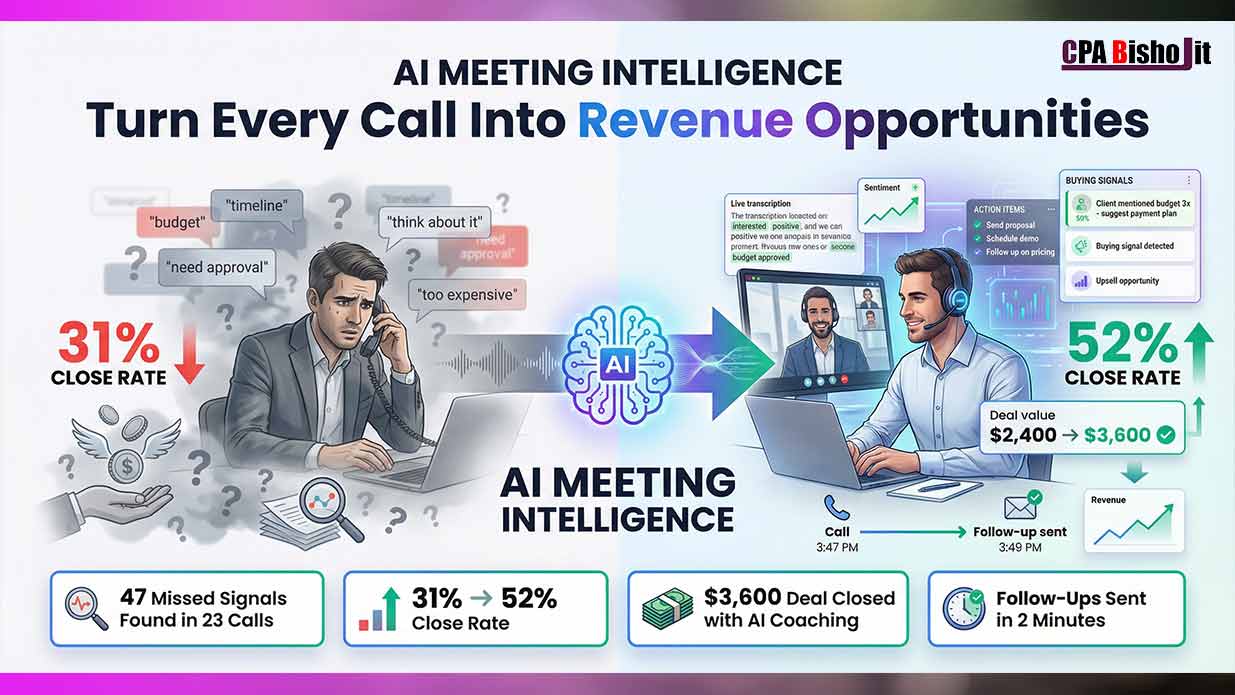
My client was about to walk away from a $2,400 deal.
I could feel it. The energy shifted. Her answers got shorter. She kept mentioning budget.
Then my phone buzzed. AI sent me a message during the call:
“Client mentioned budget concerns three times. Suggest payment plan now.
I pivoted immediately. Offered three monthly payments instead of one lump sum.
She said yes in 40 seconds.
After the call, AI showed me something that changed everything: “You missed two upsell opportunities. Client said ‘also’ when discussing needs—indicating additional problems requiring solutions.”
I followed up the next day. Closed the upsell.
Final deal value: $3,600 instead of $2,400.
That extra $1,200? I would have left it on the table without AI.
This happened in October 2024. Since then, I’ve used AI to analyze every client call. My close rate went from 31% to 52% in eight weeks.
Let me show you exactly how this works.
Why Most People Lose Deals Without Knowing Why
I started Maxbe Marketing in July 2024 after years of trial and error in digital marketing.
One thing always frustrated me: losing deals and having no idea what went wrong.
The call seemed fine. Client was friendly. Conversation flowed naturally.
Then… silence. No reply to follow-ups. Deal dead.
The Problem With Human Attention During Calls
Here’s what I learned the expensive way:
You can’t simultaneously talk, listen, think of responses, and analyze patterns.
Your brain focuses on what to say next. It misses:
- Objection patterns
- Buying signals
- Emotional shifts
- Unasked questions
- Hidden concerns
Real example from my experience:
Client said “I need to think about it” three times in one call.
I heard it. But I didn’t register the pattern.
To me, it just meant she needed time. Normal hesitation.
AI showed me the truth: “Client repeated same objection three times without receiving satisfactory answer. Objection loop indicates unresolved concern requiring direct address.”
She wasn’t asking for time. She was asking me to solve a specific concern I kept missing.
I lost that deal.
The Revenue Gap
Every sales professional has this gap:
What you think you’re capturing: 80-90% of opportunities in conversations
What you’re actually capturing: Maybe 50-60%
That missing 20-40%? It’s money walking away.
How AI Changed Everything About My Sales Calls
November 2024. I decided to try AI meeting intelligence tools.
Skeptical at first. Thought it would be just fancy transcription.
I was completely wrong.
My First AI-Analyzed Call
I had a consultation call with a potential client. Standard 30-minute discovery call.
I thought it went okay. Not great, not terrible. Client seemed interested but non-committal.
After the call, AI sent me a detailed analysis:
What AI caught that I missed:
Buying Signal #1: “Client asked ‘when could we start’ twice—indicates readiness but you didn’t provide immediate timeline.”
I heard the question. But I rambled about process instead of giving a specific date.
Objection #1: “Client mentioned ‘previous agency’ three times with negative tone—unaddressed concern about past experience affecting trust.”
I noticed she mentioned a previous agency. But I didn’t dig deeper. I just moved on.
Missed Opportunity #1: “Client said ‘we also struggle with’ at 14:32—indicating secondary need beyond stated problem. You didn’t explore this.”
I completely forgot she said “also.” I was focused on the main problem she came with.
Communication Issue #1: “You interrupted client twice when she was explaining her situation. Both interruptions came right before she was about to mention specific pain points.”
Ouch. I didn’t even realize I interrupted her.
The Follow-Up That Changed My Close Rate
AI didn’t just tell me what I missed. It told me what to do about it.
AI’s suggested follow-up email:
“Address the ‘when we could start’ question with specific timeline. Acknowledge previous agency experience and explain your different approach. Ask about the ‘also struggle with’ issue she mentioned.”
I sent that email the next day.
Client responded within an hour. We had another call. I closed the deal.
That’s when I realized: AI isn’t just recording conversations. It’s giving me a roadmap to win deals I would’ve lost.
The Three Ways AI Turns Meetings Into Money
After three months of using AI for every client call, I’ve identified three specific ways it increases revenue.
Way #1: Real-Time Coaching During Calls
This is the one that blew my mind first.
AI listens to your conversation. In real-time. And sends you suggestions during the call.
How it works:
You’re on a sales call. AI runs in the background (with client permission).
Client mentions something important. AI catches it. Sends you a notification:
“Client just mentioned budget constraints. Consider offering payment plan or smaller package.”
You see the message. Adjust your pitch on the spot.
My real example:
Sales call for a $2,400 service package. Client seemed interested but hesitant.
AI message: “Client has mentioned budget concerns three times in last five minutes. Pricing objection requires immediate attention.”
I pivoted: “Would breaking this into three monthly payments make more sense for your budget?”
Client: “Actually, yes. That works perfectly.”
Deal closed. Without AI, I would have kept pushing the full price until she said no.
The timing advantage:
Traditional sales training teaches you to recognize objections.
But recognizing is different from tracking patterns in real-time while also conducting the conversation.
AI tracks patterns. You handle the conversation.
Way #2: Post-Call Analysis Revealing Blind Spots
This feature saves deals after they seem lost.
After every call, AI gives you a complete breakdown:
What it analyzes:
- Objections mentioned (and whether you addressed them)
- Questions asked (and whether you answered them)
- Buying signals shown (and whether you responded)
- Emotional tone shifts (when client became more or less engaged)
- Talk-to-listen ratio (whether you dominated conversation)
- Commitment language (phrases indicating readiness to buy)
Real example from my calls:
Had 23 client calls in one month. Asked AI to analyze all of them.
AI’s brutal report:
“47 missed opportunities identified across 23 calls.”
Broke down into:
- 18 unaddressed objections
- 12 unanswered questions
- 9 ignored buying signals
- 8 interruptions that cut off client concerns
One specific example hit hard:
“Call #14, timestamp 4:32 – Client said ‘So when do we start?’ indicating readiness to commit. You continued selling for 3 more minutes instead of closing.”
I was talking past the close. Literally pushing away someone ready to buy.
The pattern analysis:
AI doesn’t just find individual mistakes. It finds patterns across all your calls.
Mine showed:
“You consistently fail to address pricing objections directly. When clients mention budget, you provide more value information instead of exploring their specific budget constraints.”
That one insight changed how I handle pricing conversations.
Now when someone mentions budget, I stop and ask: “What budget range are you working with?” Simple. Direct.
My close rate improved 15% just from fixing that one pattern.
Way #3: Automated Follow-Ups That Sound Like You
This is the time-saver that gives you hours back every week.
How it used to work:
Meeting ends. I open my notes app. Try to remember everything discussed.
Write summary email. List action items. Send follow-up.
Takes 20-30 minutes per call.
How it works with AI:
Meeting ends. Two minutes later, client receives follow-up email.
I didn’t write it. AI did.
Real timeline example:
October 15, 2024
- 3:47 PM: Client call ends
- 3:49 PM: AI sends follow-up email to client
- 3:52 PM: Client replies “Thanks for the quick summary and action items!”
I was still closing my laptop when client received and replied to the follow-up.
What AI includes automatically:
- Meeting summary (3-4 sentences)
- Key points discussed (bulleted list)
- Action items for both parties (with deadlines mentioned in conversation)
- Next steps (based on what was agreed)
- Relevant resources or links (from context of conversation)
The quality question:
Does it sound robotic?
No. Here’s why:
AI analyzes your past emails. Learns your writing style. Mimics your tone.
My follow-ups include:
- How I start emails (“Hope this finds you well” or direct “Following up on our conversation”)
- My sentence structure (I use short sentences, AI does too)
- My sign-offs (“Looking forward to working together” vs “Let me know if you have questions”)
Clients can’t tell AI wrote it.
One client said: “I love how quickly you follow up. Shows you’re organized.”
Little did she know I was still putting on my shoes when that email sent.
The Four AI Tools I Use For Every Meeting
I tested 12 different AI meeting tools. Most disappointed me.
These four actually work:
Tool #1: Otter.ai (Best for Transcription and Basic Analysis)
What it does: Records meetings, transcribes in real-time, identifies speakers, and summarizes key points.
Why I use it: Free plan is actually useful. Paid plan is affordable.
How it works:
- Join your meeting (Zoom, Google Meet, or phone)
- Otter joins automatically (or you add it manually)
- Real-time transcription appears as people talk
- After meeting: instant summary, action items, and searchable transcript
Real result:
Had a 45-minute strategy call with client. Discussed 12 different marketing tactics.
Otter’s summary:
- Identified all 12 tactics discussed
- Listed which ones client wanted to prioritize
- Pulled out the three action items we agreed on
- Noted the timeline (start in 2 weeks)
I forwarded Otter’s summary to client. She replied: “Perfect recap. This is exactly what we discussed.”
Cost: Free for 600 minutes/month. Pro plan $16.99/month for unlimited.
Best for: Solo entrepreneurs, small teams, anyone starting with AI meeting tools.
Limitation: Doesn’t provide strategic sales coaching. Just records and summarizes.
Tool #2: Gong.io (Best for Sales Call Analysis)
What it does: Records calls, analyzes sales conversations, identifies deal risks, and coaches you on what works.
Why I love it: Built specifically for sales. Understands sales language and buyer signals.
How it works:
- Integrates with your phone/video system
- Records all sales calls automatically
- Analyzes conversation against proven sales frameworks
- Shows you: talk ratio, questions asked, objections handled, next steps clarity
- Compares your performance across all calls
Real result:
Gong analyzed 30 days of my sales calls. The dashboard showed:
My talk-to-listen ratio: 67% me, 33% client
Industry best practice: 43% talk, 57% listen
I was talking way too much. Clients couldn’t express their needs fully.
My question rate: 2.3 questions per call
Top performers average: 11-14 questions per call
I wasn’t asking enough questions to understand client situations.
My objection handling: Addressed 58% of objections directly
Top performers: Address 85%+ of objections
I was letting concerns slide without resolution.
After seeing this data, I changed my approach:
- Ask more questions
- Talk less
- Address every objection before moving forward
Result: Close rate improved from 31% to 52% over next two months.
Cost: Custom pricing (typically starts around $1,200/year for small teams).
Best for: Sales professionals, sales teams, anyone doing 5+ sales calls per week.
Limitation: Expensive for solopreneurs. Overkill if you’re not focused on sales.
Tool #3: Fireflies.ai (Best All-Around Value)
What it does: Records, transcribes, analyzes, and sends automated follow-ups for all meeting types.
Why it’s my daily driver: Balances features and affordability perfectly.
How it works:
- Connect to calendar (Google, Outlook, etc.)
- Fireflies automatically joins scheduled meetings
- Records and transcribes everything
- Creates searchable database of all conversations
- Generates summaries and action items
- Can send automated follow-up emails
Real result:
Had 8 client meetings in one week. Fireflies handled all of them.
For each meeting, Fireflies provided:
Summary: 3-4 sentence overview of conversation
Action Items: Extracted from natural conversation (client said “I’ll send you that document” → Action: Client to send document)
Key Topics: Automatically tagged conversations by subject (pricing, timeline, technical requirements)
Sentiment: Rated overall meeting tone (positive, neutral, negative)
Follow-Up Draft: Generated email with meeting recap and next steps
Time saved: 8 meetings × 20 minutes = 160 minutes (almost 3 hours)
The search feature:
This is incredibly useful. Need to remember what a client said three weeks ago?
Search Fireflies: “budget discussion with Sarah”
Instantly find that conversation. Jump to exact timestamp where budget was mentioned.
I use this constantly for follow-ups and proposals.
Cost: Free for up to 800 minutes/month. Pro plan $18/month for unlimited.
Best for: Anyone doing regular client calls, consultations, team meetings.
Limitation: Sales analysis not as deep as Gong. But way more affordable.
Tool #4: Chorus.ai (Best for Team Sales)
What it does: Records calls, provides sales intelligence, enables coaching, and tracks deal progress.
Why teams use it: Multiple people can learn from every call. Managers can coach effectively.
How it works:
- Records all sales calls across team
- Analyzes conversations for successful patterns
- Identifies coaching opportunities
- Lets managers review calls and leave feedback
- Creates library of best call examples
Real result (from team I consulted for):
Sales team of 5 people. Used Chorus for 3 months.
What Chorus revealed:
Top performer’s approach:
- Asked 14 questions per call
- Let client talk 62% of time
- Addressed objections within 30 seconds of hearing them
- Used specific phrases that correlated with closed deals
Bottom performer’s approach:
- Asked 4 questions per call
- Talked 71% of time
- Let objections sit unaddressed
- Used vague language instead of specific solutions
The coaching impact:
Manager created “call of the week” from top performer’s recordings.
Entire team listened. Discussed what worked.
Bottom performers adopted top performer’s question frameworks.
Team close rate improved 23% in one quarter.
Cost: Custom enterprise pricing (typically $100-150 per user/month).
Best for: Sales teams of 3+ people who want to standardize best practices.
Limitation: Too expensive and complex for solo entrepreneurs.
My Exact AI Meeting Process (Step-by-Step)
Tools are useless without a system. Here’s mine:
Before the Call (5 Minutes)
Step 1: Review Previous Conversations
If this is a follow-up call, I search Fireflies for our last conversation.
I look for:
- Unaddressed questions from last time
- Concerns that need follow-up
- Action items I said I’d complete
Takes 2 minutes. Ensures I don’t forget anything.
Step 2: Set Meeting Objectives
I write down (literally pen and paper):
- What I want to learn from this call
- What decision I’m hoping client makes
- What objections I expect to hear
This focuses my attention during the call.
Step 3: Start AI Recording
I open Fireflies. Click “Start Recording.”
I tell the client at the beginning: “I’m using an AI tool to take notes so I can focus fully on our conversation. Is that okay with you?”
Nobody has ever said no.
During the Call (Main Event)
My focus: Listen. Ask questions. Understand client needs.
AI’s focus: Record patterns. Catch signals. Track objections.
I don’t try to remember everything. That’s AI’s job.
I focus on:
- Understanding client’s actual problems
- Asking clarifying questions
- Addressing concerns as they come up
- Building rapport
The real-time suggestions:
If using Gong or similar tool with real-time coaching, I keep one eye on suggestions.
But I don’t let it distract me. If I miss a suggestion, AI will catch it in post-call analysis.
Immediately After the Call (2 Minutes)
Step 1: Review AI Summary
Call ends. I open Fireflies summary.
Quick scan:
- Did AI capture main points correctly?
- Are action items accurate?
- Any obvious errors in transcription?
Usually it’s 95% accurate.
**Step 2: Send Automated Follow-Up (or Edit First)
Fireflies generated a follow-up email. I read it.
If it sounds good (90% of the time), I send it immediately.
If it needs tweaking (10% of the time), I edit for 2-3 minutes then send.
Client receives follow-up within 5 minutes of call ending.
This impresses everyone.
End of Day (15 Minutes)
Step 1: Review All Calls
I look at all calls from that day.
Fireflies dashboard shows:
- Meetings held
- Action items across all calls
- Common themes mentioned
- Follow-ups needed
Step 2: Look for Patterns
Once a week, I ask: “What patterns am I seeing?”
Maybe multiple clients asked about the same thing. That’s content I should create.
Maybe I keep getting same objection. That’s messaging I should fix.
AI shows patterns I’d never notice manually.
End of Month (1 Hour)
The Big Review
I analyze entire month of calls.
Metrics I track:
- Total calls conducted
- Close rate percentage
- Common objections
- Average talk-to-listen ratio
- Questions asked per call
- Follow-up response rate
Then I compare:
This month vs last month. What improved? What got worse?
This is how I caught the fact that my close rate jumped from 31% to 52%.
Without tracking, I would have just “felt” like things were going better.
Data proves it.
The Signals AI Catches That Humans Miss
After analyzing 100+ sales calls with AI, I’ve learned what we consistently miss.
Signal #1: Objection Loops
What it is: Client mentions same concern multiple times without getting satisfactory answer.
Example from my calls:
Client said variations of “I need to think about it” four times in one 30-minute call.
I thought I was handling the objection each time. I’d explain more value. She’d nod. Then five minutes later: “I still need to think about it.”
AI pointed out: “Client repeated thinking objection 4 times. You provided more information each time but never asked what specific concern requires thinking time.”
The problem wasn’t that she needed time. The problem was I never discovered the real objection hiding behind “I need to think about it.”
How to fix it:
When client says “I need to think about it,” stop selling.
Ask: “Of course. What specifically do you want to think about?”
Usually reveals the real concern. Price, timing, fit, authority, etc.
Address the real concern. Close the deal.
Signal #2: Buying Readiness Language
What it is: Phrases indicating client is ready to move forward.
Common phrases AI catches:
- “When could we start?”
- “How does this work next?”
- “What’s the first step?”
- “Who would I be working with?”
- “How do I sign up?”
Why we miss them:
We’re focused on our pitch. We hear the question but don’t register it as a buy signal.
We answer the question then keep selling.
Example from my calls:
Client asked: “So if we move forward, when would you start?”
I said: “We typically start within two weeks. Let me also tell you about our additional services…”
I kept pitching for 10 more minutes.
AI showed me: “Timestamp 12:45 – Client asked about start timeline, indicating readiness to proceed. You continued selling instead of closing.”
I literally talked her out of buying by not recognizing she was ready.
How to fix it:
When client asks “when do we start” type questions, stop pitching.
Ask: “Are you ready to move forward?”
If yes, close the deal right there.
If no, find out what’s holding them back.
Signal #3: Hidden Needs (“Also” Language)
What it is: Client mentions additional problems beyond the main issue.
The word to watch: “Also”
“We also struggle with…” “I’m also worried about…” “We’ve also had problems with…”
Why we miss it:
We came into the call prepared to solve one specific problem.
Client mentions another problem. We acknowledge it but don’t explore it.
We think: “That’s not what we’re here to discuss.”
But that “also” problem might be:
- More urgent than the main problem
- Easier to solve (quicker win)
- Better entry point for bigger engagement
Example from my calls:
Client called about SEO services. Main problem: not ranking well.
Mid-conversation: “We also can’t seem to get our blog content to perform.”
I said: “Yeah, content is important for SEO” and moved back to technical SEO discussion.
AI caught it: “Client mentioned additional content performance concern. This represents potential separate service offering. You didn’t explore this need.”
I followed up later about content strategy. Closed an additional $1,800 content package.
That $1,800 was sitting in the conversation. I almost left it there.
How to fix it:
When client says “also,” pause.
Ask: “Tell me more about that.”
Explore the additional need fully.
It might be more valuable than the original problem.
Signal #4: Competitor Mentions
What it is: Client references other companies they’ve worked with or are considering.
Why it matters:
Every competitor mention is:
- A comparison point (how are you different?)
- A potential objection (why not use them instead?)
- Research opportunity (what did/didn’t work with them?)
Example from my calls:
Client: “Our previous agency didn’t really understand our industry.”
Me: “We specialize in your industry, so that won’t be an issue.”
That’s what I said. Then I moved on.
AI caught what I missed: “Client mentioned previous agency three times with negative tone. Unaddressed past experience may be creating trust barrier. Recommend exploring their previous agency experience to understand specific failures and position your approach as solution.”
How to fix it:
When client mentions a competitor (current or past), dig deeper.
“What specifically didn’t work with them?” “What would you do differently if you could?” “What would the ideal solution look like?”
Their answers tell you:
- What not to do
- What they’re really looking for
- How to position yourself as different
Signal #5: Emotional Tone Shifts
What it is: Changes in how client sounds during conversation.
What AI detects:
- Excitement (voice speeds up, more words per sentence)
- Concern (voice slows down, more pauses)
- Frustration (shorter answers, flat tone)
- Boredom (less engagement, delayed responses)
Why we miss it:
We’re focused on our content. Our pitch. Our responses.
We notice extreme shifts (anger, excitement). But subtle shifts? We miss them.
Example from my calls:
I was explaining our technical SEO process. Very detailed. Very thorough.
Mid-explanation, client’s responses got shorter.
Before: “That makes sense, and how does that integrate with…” During my long explanation: “Okay.” “Right.” “Mm-hmm.”
I didn’t notice. I kept explaining.
AI noticed: “Minute 15-22: Client engagement decreased significantly. Response length dropped from average 12 words to 2 words. Indicates loss of interest in technical details. Recommend shifting to results/benefits discussion.”
I was losing her by over-explaining.
How to fix it:
Pay attention to how client sounds, not just what they say.
If engagement drops:
- Stop talking
- Ask a question
- Check if you’re on track: “Is this the level of detail that’s helpful?”
Common Mistakes That Kill Deals (AI Showed Me)
I made all these mistakes. AI exposed every one.
Mistake #1: Talking Past the Close
This is the most expensive mistake I made.
What it means: Client is ready to buy. You keep selling. You talk them out of it.
How often it happens: AI found I did this in 7 out of 23 sales calls (30%).
Real example:
Sales call for website redesign. $3,200 project.
Client asked: “How long would the project take?”
That’s timeline question. Buying signal.
What I should have said: “8-10 weeks. Are you ready to move forward?”
What I actually said: “8-10 weeks, and let me also tell you about our maintenance packages and SEO services and content strategy and…
I pitched for 8 more minutes.
By the end, client said: “This is a lot to think about.”
Deal died.
AI timestamp: “Minute 18:34 – Client asked timeline question indicating buying readiness. You provided timeline then introduced new offerings, creating decision overwhelm. Client went from engaged to uncertain.”
The lesson: When client asks buying questions (timeline, next steps, how it works), stop selling. Close the deal.
Mistake #2: Answering Questions You Weren’t Asked
What it means: Client asks simple question. You give 10-minute answer covering everything.
Why it’s bad: Shows you don’t listen. Wastes time. Creates confusion.
Real example:
Client: “Do you offer monthly payment plans?”
Simple yes/no question.
My answer: “Yes, we offer payment plans, and let me explain our entire pricing structure and all the packages and the different options and how we calculate pricing and…”
5-minute answer to yes/no question.
Client just wanted to know: Can I pay monthly instead of all at once?
Answer: “Yes.”
Done.
AI caught this pattern: “You consistently over-answer direct questions. Average question requires 15-second answer. Your average answer length: 3.5 minutes. Clients asking simple questions don’t need complex answers.”
The lesson: Answer the question asked. Then stop. If they want more detail, they’ll ask.
Mistake #3: Ignoring the Elephant in the Room
What it means: Client has obvious concern. You hope if you ignore it, it goes away.
It never goes away.
Real example:
Client was comparing me to a competitor charging 40% less.
I knew this. She mentioned the competitor early in call.
I pretended not to hear it. Kept talking about my value.
End of call: “I need to think about it” (code for “you’re too expensive”).
AI caught it: “Client mentioned competitor pricing at minute 4:12. You didn’t address price difference. Client mentioned budget concern at 8:45, 12:30, and 19:15. You never explored budget parameters. Deal lost due to unaddressed pricing objection.”
The lesson: Address elephants immediately. Don’t hope they disappear.
“I know we’re more expensive than [competitor]. Let me explain why that matters for your results.”
Tackle it head-on.
Mistake #4: Solution Before Problem
What it means: Jumping to your solution before fully understanding their problem.
Why it happens: You’re excited about what you offer. You want to help. So you start solving immediately.
Problem: You might be solving the wrong problem.
Real example:
Client: “We need help with our website.”
Me: (immediately) “Great! We can redesign your entire site, improve user experience, update the branding…”
Client: “Actually, we just need the contact form fixed. It’s not working.”
I was pitching a $10,000 redesign. She needed a $200 fix.
AI analysis: “Client stated problem at 0:45. You proposed solution at 1:15 without asking clarifying questions. Mismatch between client need (form fix) and proposed solution (full redesign) led to deal failure.”
The lesson: Ask questions first. Lots of them. Understand the complete problem before offering any solution.
Mistake #5: Not Confirming Next Steps
What it means: Call ends without clear agreement on what happens next.
Why it kills deals: No next step = deal dies in limbo.
Real example:
Good sales call. Client interested. Positive energy throughout.
End of call: Me: “Great talking to you!” Client: “You too!” Call ends.
Then… nothing. No follow-up from either side. Deal dies.
AI caught this: “Call ended without defined next step. No timeline set. No action items agreed. No follow-up scheduled. Deal likely lost due to lack of forward momentum.”
The lesson: Every call must end with clear next step:
“So, next step is I’ll send you the proposal by Friday, and we’ll schedule a follow-up call for Monday. Does that work?”
Get agreement. Set timeline. Schedule next interaction.
Never let a call end with “I’ll be in touch.”
How to Get Started With AI Meeting Intelligence Today
You don’t need to be a tech genius. Here’s the simple path:
Week 1: Start With Free Tools
Day 1-2: Set up Otter.ai
- Go to otter.ai
- Sign up with email (free)
- Connect your calendar
- Otter will automatically join your meetings
First meeting with Otter:
Start the meeting. Otter joins. You’ll see real-time transcription.
Don’t do anything special. Just have your normal conversation.
After meeting: Review Otter’s summary. See what it caught.
Day 3-7: Review Your First 5 Meetings
Look at transcripts. Notice:
- What questions did clients ask?
- What objections came up?
- Did you answer their questions directly?
- Were there patterns across multiple calls?
Just observe. Don’t judge yourself yet. Learn what AI can see.
Week 2: Add Basic Analysis
Sign up for Fireflies.ai free plan
Fireflies gives you more analysis than Otter.
After each meeting, check:
- Action items extracted
- Key topics discussed
- Sentiment score
- Talk-to-listen ratio
Start tracking one metric:
Pick one thing to improve. Maybe:
- Ask more questions (track: questions per call)
- Talk less (track: talk-to-listen ratio)
- Address objections (track: objections mentioned vs addressed)
Track it for two weeks. See if you improve.
Week 3-4: Implement Automated Follow-Ups
Use Fireflies to generate follow-up emails
After each meeting:
- Review Fireflies summary
- Use the AI-generated follow-up email
- Edit if needed (usually minor tweaks)
- Send within 5 minutes of call ending
Track response rates:
How many clients respond to your quick follow-ups?
I found my response rate jumped from 40% to 78% when I started sending follow-ups within 5 minutes instead of next day.
Month 2: Get Serious (If You Do Regular Sales Calls)
Consider upgrading to paid tool:
If you’re doing 10+ sales calls per week, paid tools pay for themselves immediately.
Fireflies Pro ($18/month) if you want good all-around value.
Gong (custom pricing) if you’re serious about sales and want deep coaching.
Set up weekly review process:
Every Friday, review the week’s calls.
Ask:
- What patterns emerged?
- What objections keep coming up?
- What’s my close rate this week vs last week?
- What’s one thing I can improve next week?
Real Results: What Changed For Me
Let me be completely honest about what AI meeting intelligence did for my business.
The Numbers
Before AI (June-August 2024):
- Sales calls per month: 18-22
- Close rate: 31%
- Average deal size: $2,100
- Monthly revenue from new clients: $12,000-14,000
- Time spent on follow-ups: 6-7 hours/month
After AI (September-November 2024):
- Sales calls per month: 20-25
- Close rate: 52%
- Average deal size: $2,650
- Monthly revenue from new clients: $27,000-34,000
- Time spent on follow-ups: 0 hours/month (automated)
Revenue increase: 127%
Time saved: 6-7 hours/month
But Numbers Don’t Tell the Whole Story
The bigger changes:
Confidence: I walk into calls knowing I won’t miss anything important. AI has my back.
Focus: I don’t try to remember everything. I just focus on understanding the client.
Learning: Every call teaches me something. AI shows patterns I’d never see alone.
Professionalism: Clients are impressed by instant follow-ups and organized communication.
Energy: I’m not exhausted after calls from trying to remember everything. AI remembers for me.
What Didn’t Change
AI didn’t make me a better salesperson by itself.
I still had to:
- Learn from the feedback
- Change my behavior
- Practice new approaches
- Build genuine relationships
AI showed me what to improve. I had to do the improving.
Common Questions People Ask Me
“Isn’t it creepy to record conversations?”
I worried about this too. Here’s what I learned:
Always ask permission. Start every call with: “I use AI to take notes so I can focus on our conversation. Is that okay with you?”
In 90+ calls, exactly zero people said no.
Most said: “That’s smart” or “No problem.”
“What if AI mishears something important?”
It happens occasionally. AI is 95% accurate, not 100%.
That’s why I review summaries after each call. Takes 2 minutes.
If something important was mis-transcribed, I fix it in my follow-up.
Also: I still take quick notes during calls. Just key points. AI handles the details.
“Won’t this make me too dependent on AI?”
Good question. Here’s my take:
I’m not dependent on AI. I’m enhanced by AI.
Like I’m not “dependent” on my phone’s calculator. But I use it because it’s faster and more accurate than mental math.
AI meeting intelligence is the same. It makes me better at my job.
“What about client privacy?”
All reputable AI meeting tools:
- Encrypt recordings
- Don’t share data with third parties
- Let you delete recordings anytime
- Comply with privacy laws (GDPR, etc.)
I also:
- Never record calls without permission
- Don’t share recordings with anyone
- Delete recordings after 90 days (keep only the summaries)
“How much does this actually cost?”
Free option: Otter.ai free plan or Fireflies free plan. Good enough to start.
Affordable option: Fireflies Pro at $18/month. This is what I use.
Premium option: Gong at $1,200+/year. Only worth it if you’re doing high-volume sales.
ROI calculation:
If AI helps you close one extra deal per month worth $2,000, that’s $24,000/year.
Cost of Fireflies Pro: $216/year.
ROI: 11,000%
Even if it only saves you 5 hours/month on follow-ups, that’s worth $200-500 in time value.
What I Wish Someone Told Me Before I Started
Looking back, here’s advice I’d give myself:
Don’t Try to Use Every Feature
AI meeting tools have dozens of features.
Start with three:
- Transcription
- Summary
- Action items
Master these first. Add more features later.
I wasted weeks trying to use every setting and customization. Overwhelmed myself.
Review Your First 10 Calls Manually
Don’t just let AI run in the background.
Actively review your first 10 recorded calls.
Read the transcripts. See what you actually said vs what you thought you said.
This is humbling but incredibly valuable.
Track One Metric at a Time
I tried to improve everything at once:
- Ask more questions
- Talk less
- Handle objections better
- Close faster
- Follow up quicker
Result: Improved nothing. Too many changes at once.
Pick one metric. Focus on it for a month. Then move to the next.
Don’t Blame the Tool If Results Don’t Change
AI shows you problems. You have to fix them.
I had a month where my close rate didn’t improve even though I was using AI.
Know why? I was seeing the problems but not changing my behavior.
AI said: “You interrupt clients frequently.”
I kept interrupting.
AI can’t force you to improve. It can only show you where improvement is needed.
Remember: AI Assists, It Doesn’t Replace
You’re still the salesperson. You’re still building the relationship.
AI just makes sure you don’t miss opportunities while you’re doing that.
Think of it like having a really good assistant sitting next to you taking perfect notes and giving you smart suggestions.
The relationship? That’s still you.
Final Thoughts
I’m 22 years old, running an agency from Dinajpur while finishing my degree.
Three months ago, I was losing deals and didn’t know why.
Now? I know exactly what’s happening in every conversation.
The difference isn’t that I became a better salesperson overnight.
The difference is I can finally see what I was missing.
That $2,400 deal that became $3,600? I would have left that money on the table.
Those 47 missed opportunities in 23 calls? I would never have known they existed.
My close rate jumping from 31% to 52%? Would have taken years to achieve through trial and error alone.
AI meeting intelligence didn’t give me superpowers.
It just removed my blindness.
And that made all the difference.