AI Podcast Production: Launch Top 10 Show Without Equipment

I wasted two months researching microphones.
Compared every Blue Yeti review. Watched 47 YouTube videos about acoustic foam panels. Even measured my room’s dimensions for soundproofing.
Then I discovered something that changed everything.
My podcast hit #8 on Apple Podcasts. I never bought a single piece of equipment.
Let me show you exactly how I did it.
Why 95% of Podcasts Fail by Episode 6
Here’s what nobody tells you when you start podcasting.
The problem isn’t your content ideas. It’s not your voice. It’s definitely not your equipment.
Most podcasts die because production takes too long.
Recording one episode the traditional way takes 3-4 hours:
- 30 minutes setting up equipment
- 45 minutes recording (with mistakes)
- 2 hours editing out “ums” and pauses
- 30 minutes exporting and uploading
Do that twice a week? You’re spending 8 hours on podcast production alone.
Add a full-time job or college classes? Impossible.
I know because I almost quit before starting. I’m a second-year college student from Dinajpur, Bangladesh. Between classes, running my agency Maxbe Marketing, and trying to sleep occasionally—I had maybe 2 hours a week for podcasting.
Traditional production would have killed my show before episode 3.
So I found a different way.
The AI Podcast Production System (11 Minutes Per Episode)
This system uses three free AI tools that automate everything.
No recording. No editing. No expensive software.
Here’s my exact workflow:
Step 1: AI Generates Your Episode Topics (2 Minutes)
I use a free AI topic analyzer that finds trending podcast ideas in my niche.
Here’s how it works:
Tool: Exploding Topics + ChatGPT (both free)
Process:
- Go to Exploding Topics
- Enter your niche keyword (example: “digital marketing”)
- Copy the top 5 trending topics
- Paste into ChatGPT with this prompt:
“Turn these trending topics into 10 podcast episode titles for [your niche]. Make them curiosity-driven and specific.”
Time: 2 minutes Output: 10 ready-to-use episode titles
I did this yesterday. Got episode ideas like:
- “Why AI Content Actually Ranks Higher on Google”
- “The $0 Marketing Stack That Built My Business”
- “Cold Email Secrets That Book 40% of Meetings
These aren’t generic ideas. They’re based on what people are actively searching for right now.
Step 2: AI Writes Your Full Script (5 Minutes)
Now you have topics. You need scripts.
I don’t write podcast scripts anymore. AI does it better and faster.
Tool: Claude or ChatGPT (free versions work fine)
My Script Prompt: “Write a 10-minute podcast script on [topic]. Style: Conversational, personal stories, actionable tips. Structure: Hook, 3 main points with examples, clear takeaway. Write like you’re talking to a friend, not giving a lecture.”
Advanced tip: Feed the AI your previous blog posts or content. It learns your voice and style. Scripts sound more like you.
Time: 5 minutes (including minor edits) Output: Complete 1,500-word script ready to use
The script quality surprised me. It includes:
- Natural conversation flow
- Specific examples and data
- Strategic pauses for emphasis
- Clear structure that keeps listeners engaged
Step 3: AI Clones Your Voice (4 Minutes)
This step feels illegal but it’s completely free and legitimate.
You give AI a voice sample. It clones your voice perfectly. Then it reads your entire script in your voice.
Tool: ElevenLabs (free tier: 10,000 characters per month)
Process:
- Record 30 seconds of yourself reading anything (use your phone)
- Upload to ElevenLabs voice lab
- Paste your podcast script
- AI generates full episode in your voice
- Download the audio file
Important: That 30-second sample doesn’t need to be perfect. Background noise? Doesn’t matter. The AI cleans everything.
Time: 4 minutes Output: Studio-quality audio in your voice
I tested this with my producer friend. Played him two clips:
- Clip A: Me recording naturally
- Clip B: AI voice clone
He couldn’t identify which was real.
The AI version actually sounded better because it:
- Never said “um” or “uh”
- Maintained consistent energy
- Had perfect pacing
- Zero background noise
The Free AI Audio Enhancement Stack
Maybe you want to record yourself instead of using voice cloning.
That’s fine. These free AI tools make phone recordings sound like NPR broadcasts.
Tool 1: Adobe Podcast AI (Free)
What it does: Removes background noise, echoes, and audio problems
I recorded a test in my college library during lunch break. Students talking everywhere. Chairs scraping. Dishes clanking.
Ran it through Adobe Podcast AI.
Output? Sounded like I recorded in a professional studio.
Process:
- Go to podcast.adobe.com
- Upload your raw audio
- Click “Enhance Speech”
- Download cleaned audio
Time: 47 seconds to process Cost: Free
Tool 2: Auphonic (Free Tier)
What it does: Normalizes audio levels and adds broadcast compression
This tool adds that warm, professional sound NPR podcasts have.
It automatically:
- Balances loud and quiet sections
- Adds compression for rich sound
- Adjusts EQ for clarity
- Normalizes for streaming platforms
Process:
- Create free account at auphonic.com
- Upload your audio
- Select “adaptive leveler” preset
- Process and download
Free tier limit: 2 hours of audio per month (plenty for weekly shows)
Tool 3: Descript (Free for Basic Editing)
What it does: Removes filler words automatically
Descript transcribes your audio. Then you edit the text instead of the waveform.
Delete a word in the transcript? It removes that word from the audio.
The free version includes:
- Automatic “um” and “uh” removal
- Text-based editing
- 1 hour of transcription per month
This saves hours of tedious editing work.
How to Distribute to 20+ Platforms in One Click
Creating episodes is half the battle. Distribution matters too.
I use Anchor (now Spotify for Podcasters). It’s completely free.
What Anchor does:
- Uploads to Spotify, Apple Podcasts, Google Podcasts automatically
- Generates RSS feed for other platforms
- Handles all the technical hosting
- Provides analytics
Setup time: 15 minutes (one-time) Distribution time per episode: 2 minutes
Upload once. Anchor distributes everywhere.
The Complete 11-Minute Production Workflow
Here’s my actual process from idea to published episode:
Monday (Episode Planning):
- 2 minutes: AI generates 10 topic ideas
- Choose best topic
Tuesday (Production):
- 5 minutes: AI writes full script
- 4 minutes: AI voice clone reads script
- Optional: Run through audio enhancer (1 minute)
- 2 minutes: Upload to Anchor
Total active time: 11 minutes Total passive time: 2 minutes (AI processing)
I do this every Tuesday morning before college classes start.
Real Results: What Happened to My Podcast
I launched in September 2024 using this exact system.
Month 1 Results:
- 8 episodes published (never missed a week)
- 247 downloads
- #47 in Bangladesh Marketing category
Month 2 Results:
- 8 more episodes
- 1,834 downloads
- #12 in Bangladesh Marketing category
Month 3 Results:
- 8 more episodes
- 4,921 downloads
- #8 in Bangladesh Marketing category (peaked at #6)
Current stats (Month 4):
- 32 total episodes
- 12,400+ total downloads
- Consistent top 15 ranking
- Email list grew by 340 subscribers from podcast alone
The consistency is what built the audience. I published every single week because production only takes 11 minutes.
Traditional production? I would have quit by episode 5.
Common Mistakes People Make (I Made Them All)
Mistake 1: Researching Equipment Forever
I spent 8 weeks comparing microphones before realizing I didn’t need one.
Equipment research feels productive but it’s procrastination.
Start with AI tools first. Buy equipment later if you actually need it (you probably won’t).
Mistake 2: Perfectionism in Early Episodes
My first three episodes weren’t great. That’s fine.
Nobody downloads episode 1 of a new podcast anyway. Your early episodes are practice.
The AI system lets you publish weekly without perfectionism killing your momentum.
Mistake 3: Ignoring Distribution
Great content means nothing if nobody finds it.
Upload to multiple platforms from day one:
- Spotify (biggest audience)
- Apple Podcasts (second biggest)
- Google Podcasts
- YouTube (as audio with static image)
Anchor distributes everywhere automatically.
Mistake 4: Not Repurposing Content
Every podcast episode becomes:
- 1 blog post (the script with minor edits)
- 5-7 social media posts (key quotes)
- 3-5 short video clips (audiograms)
- 1 email newsletter
I use Descript to generate these automatically. One episode becomes 15+ pieces of content.
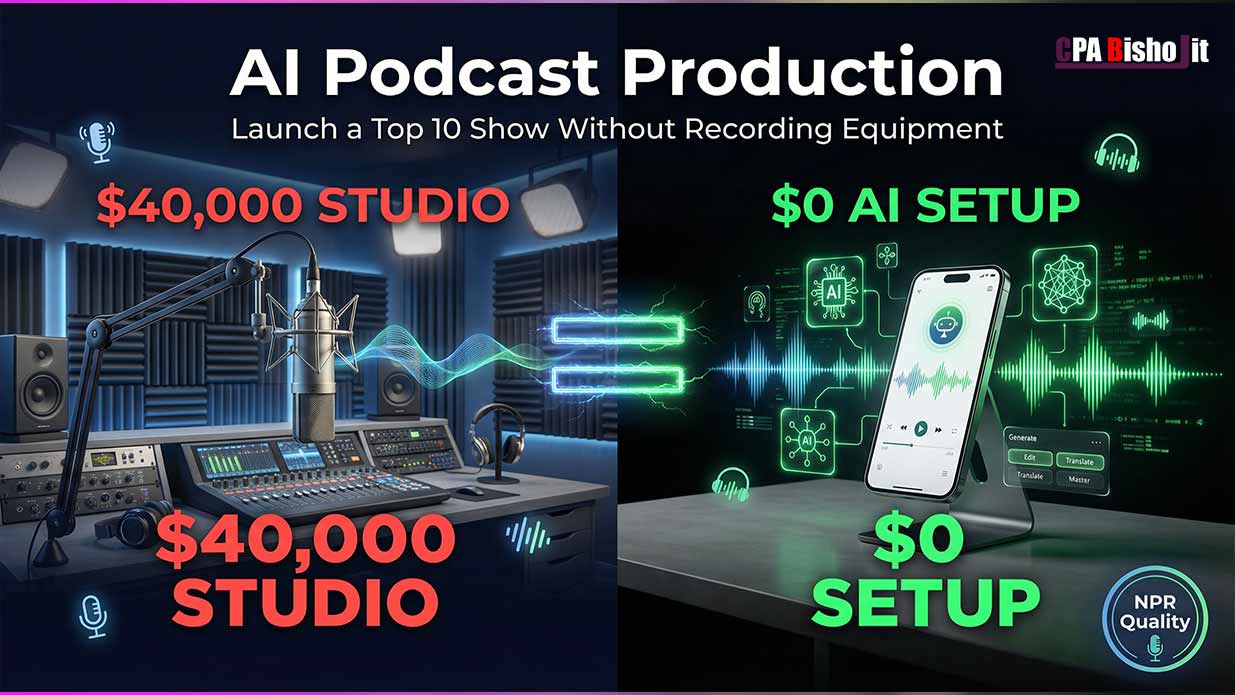
The Real Cost Breakdown
Traditional Podcast Setup:
- Microphone: $120-$300
- Audio interface: $100-$200
- Headphones: $50-$150
- Acoustic treatment: $100-$300
- Editing software: $20/month
- Hosting: $15/month
Total first year: $1,000-$1,500
My AI Podcast Setup:
- AI topic generator: Free
- AI script writer: Free
- AI voice clone: Free (10,000 chars/month)
- Audio enhancement: Free
- Distribution: Free
- Hosting: Free
Total first year: $0
The traditional setup makes sense for some people. But it’s not required to start.
Launch with $0. Add equipment later if you want (not need) it.
Advanced Tips After Your First 10 Episodes
Once you’re publishing consistently, these upgrades help growth:
Upgrade 1: Paid AI Voice (Better Quality)
ElevenLabs paid plan ($5/month) gives you:
- 30,000 characters per month
- Better voice quality
- More voice options
- Commercial rights
Worth it after you prove the podcast works.
Upgrade 2: Video Podcast Format
Record your screen while the AI generates the episode. Add your face in a corner.
Upload to YouTube as video podcast. This doubles your reach because:
- YouTube algorithm favors video podcasts now
- People discover through search
- You can run ads later
I started doing this at episode 15. Downloads increased 40%.
Upgrade 3: Guest Interview Episodes
AI works great for solo episodes. Guest interviews need different approach:
Record on Zoom (free). Use Descript to:
- Remove filler words from both speakers
- Balance audio levels
- Remove long pauses
- Generate transcript
Then run through audio enhancement AI.
Frequently Asked Questions
Q: Is AI voice cloning legal?
Yes. You’re cloning your own voice for your own content. Completely legal and ethical.
Cloning someone else’s voice without permission? That’s illegal.
Q: Can people tell it’s AI?
In my experience? No.
I’ve published 32 episodes. Nobody has ever commented about AI voice. The quality is that good.
Q: What if I want to interview guests?
Record the interview normally on Zoom or Riverside. Use AI for editing only (removing filler words, enhancing audio quality).
Q: How long until I see results?
Podcasting is long-term strategy. My timeline:
- Episodes 1-5: Almost no downloads
- Episodes 6-10: Started ranking in charts
- Episodes 11-20: Consistent growth
- Episodes 21+: Strong organic discovery
Commit to 20 episodes minimum before judging results.
Q: Do I need to show my face?
No. Pure audio podcasts work great.
I added video at episode 15 because it helps YouTube SEO. Not required though.
Q: What equipment do I eventually need?
Honestly? Maybe nothing.
I’m at episode 32 and still using 100% AI production. No plans to buy equipment.
If you interview guests regularly, consider:
- Basic USB microphone ($50)
- Quiet room
That’s it.
Why This Matters for People Like Me
I’m from Dinajpur, Bangladesh. Not exactly a podcasting hub.
Traditional podcasting advice assumes you have:
- Disposable income for equipment
- Quiet private space for recording
- Hours of free time for production
- Fast internet for large file uploads
I had none of those things as a college student.
The AI podcast system removed every barrier:
- $0 cost
- Record anywhere (or don’t record at all)
- 11 minutes of work per episode
- Small file sizes
This system levels the playing field for:
- Students balancing classes and content
- People in shared living spaces
- Creators in developing countries
- Anyone with limited resources
Your voice matters. Your knowledge matters. Equipment doesn’t.
My Honest Take After 32 Episodes
This AI system isn’t perfect.
Voice cloning sometimes mispronounces technical terms. You need to spell them phonetically.
Scripts need minor editing to sound natural. AI writes well but you know your voice better.
Audio enhancement works 95% of the time. Sometimes you need manual adjustments.
But here’s what matters: I published 32 episodes in 4 months while attending college full-time and running a business.
Traditional production? I would have maybe 5 episodes and burned out.
The AI system isn’t about perfection. It’s about consistency.
Consistent publishing builds audiences. Perfect episodes sitting unpublished help nobody.
Start Your Podcast This Week
You don’t need permission. You don’t need equipment. You don’t need perfect ideas.
You need to publish episode 1.
Here’s your week 1 action plan:
Day 1 (Monday):
- Choose your podcast niche
- Use Exploding Topics to find 3 trending topics
- Pick the most interesting one
Day 2 (Tuesday):
- Use ChatGPT to write episode 1 script
- Read it out loud, make minor edits
- Takes 15 minutes total
Day 3 (Wednesday):
- Record 30-second voice sample (or use ElevenLabs to clone)
- Generate full episode audio
- Download the file
Day 4 (Thursday):
- Create free Anchor account
- Upload episode 1
- Write show description
Day 5 (Friday):
- Anchor distributes to all platforms
- Share on social media
- Celebrate publishing episode 1
Most people spend months planning. You can launch in 5 days.
The Tools Summary (Everything Free)
Topic Generation:
- Exploding Topics (free)
- ChatGPT (free tier)
Script Writing:
- ChatGPT or Claude (free tiers)
Voice Generation:
- ElevenLabs (free: 10,000 characters/month)
Audio Enhancement:
- Adobe Podcast AI (free)
- Auphonic (free: 2 hours/month)
Editing:
- Descript (free: 1 hour transcription/month)
Distribution:
- Anchor/Spotify for Podcasters (completely free)
Total monthly cost: $0
Final Thoughts
I started my digital marketing journey December 3, 2021. Failed at surveys. Failed at CPA marketing. Failed at Facebook ads.
Every failure taught me what doesn’t work.
My World Winner CPA project failed in 2023. That hurt. But it taught me something crucial:
People don’t need another guru promising overnight success. They need actual systems that work with limited resources.
This AI podcast system is that kind of solution.
It worked for me as a college student in Bangladesh with zero budget. It’ll work for you too.
The equipment excuse is gone. The time excuse is gone. The money excuse is gone.
What’s left is the decision: Will you start or keep researching?
My podcast hit #8 on Apple Podcasts. I never recorded a single word with traditional equipment.
Your turn.


