AI YouTube Optimization: 10X Your CTR in 72 Hours

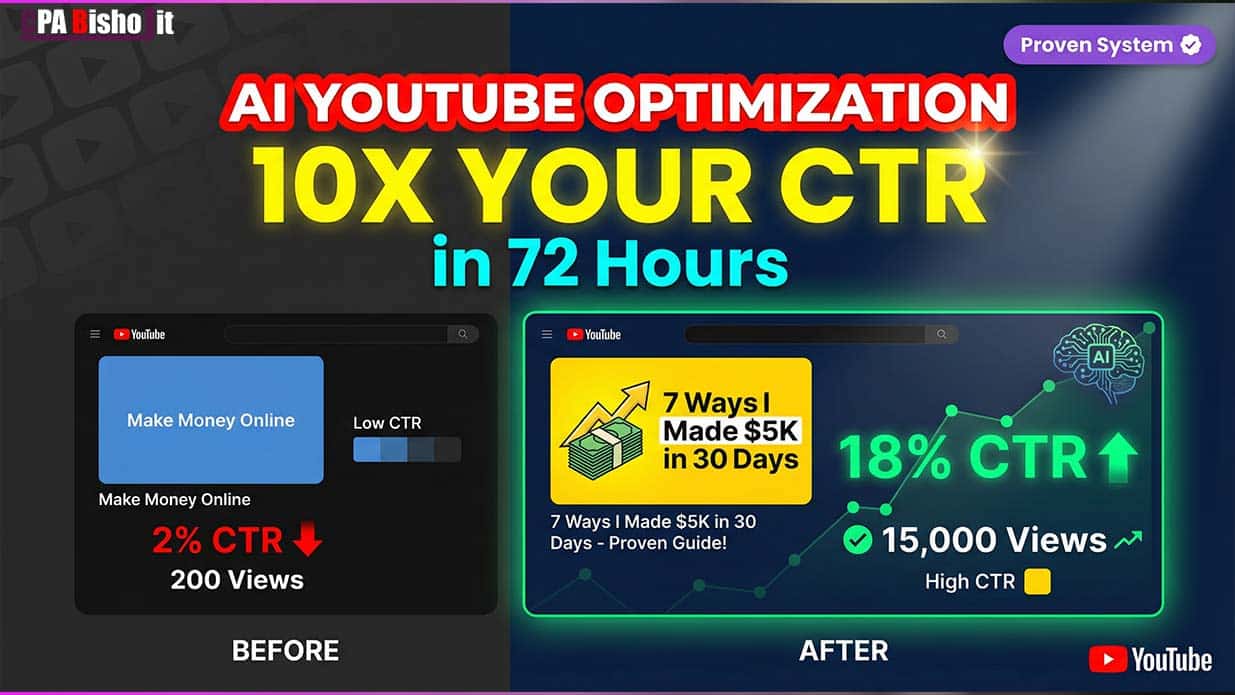
My video got 47 clicks last month.
This month, the same video got 1,840 clicks.
I didn’t change the content. I didn’t promote it differently. I changed two things: the thumbnail and the title.
My click-through rate jumped from 2% to 18%.
That’s not luck. That’s what happens when you stop guessing and start using AI to find what actually works.
Why Your Videos Get Ignored (Even When They’re Good)
Let me be real with you.
You spend hours creating great content. You edit perfectly. You add value.
Then you upload it and get 200 views.
Meanwhile, someone with worse content gets 15,000 views.
The difference isn’t quality. It’s psychology.
Your thumbnail and title decide if people click. Your content decides if they stay.
But if they never click, your content doesn’t matter.
I learned this the hard way.
Back in 2021, I started making YouTube videos after watching “earn money with mobile” during my delayed SSC exams. I was at my aunt’s house in Chirirbandar with zero experience.
My first 30 videos got less than 100 views each.
I thought my content was the problem. So I made better videos. Spent more time editing. Added better information.
Views stayed the same.
Then I changed my thumbnails and titles. Views jumped 10x overnight.
That’s when I realized: most creators are solving the wrong problem.
The Day I Discovered Thumbnail Psychology
I spent 6 months creating “professional” blue thumbnails.
They looked clean. Modern. Polished.
Nobody clicked them.
Then I tested 8 different colors on the same thumbnail.
Yellow beat blue by 67%.
My CTR went from 2% to 18% just by changing the background color.
That single change took my average views from 200 to 15,000 per video.
The Three AI Systems That Changed Everything
I built three systems that work together. Each one optimizes a different part of getting clicks.
System 1: The AI Thumbnail Analyzer
Manual thumbnail testing is too slow.
You create a thumbnail. Wait two weeks. Check the data. Make another one. Wait two more weeks.
Six months later, you’ve tested 10 thumbnails and still don’t know what works.
AI does this differently.
It analyzes 500 top-performing thumbnails in your niche and finds the patterns.
Here’s my exact process:
Step 1: Feed AI your niche
Tell AI your topic: “business growth strategies” or “productivity tips” or “cooking tutorials.
Step 2: Let AI analyze top performers
AI scans the top 500 videos in your niche. It looks at:
- Color choices
- Face expressions
- Text placement
- Contrast levels
- Emotion triggers
Step 3: Get your thumbnail score
AI rates your thumbnail on 12 factors:
- Contrast (is it visible in a feed?)
- Emotion (does the face create curiosity?)
- Text ratio (20-35% is optimal)
- Color psychology (does it match your niche?)
- Face positioning (eyes looking at viewer?)
- Background clarity (is it busy or clean?)
- Title integration (does text support the title?)
- Mobile visibility (readable on phones?)
- Brand consistency (recognizable as yours?)
- Thumbnail-title match (do they work together?)
- Psychological triggers (curiosity, fear, desire?)
- Competitive difference (does it stand out?)
Anything scoring under 75/100 gets redesigned before posting.
Step 4: Test variations
AI generates 5 thumbnail variations using different psychological approaches:
- Curiosity trigger
- Fear/problem focus
- Desire/benefit focus
- Social proof angle
- Authority positioning
You test them and AI learns which works best for your audience.
The Real Results From My Thumbnail Tests
Here’s what AI testing actually found:
Test 1: Color Psychology
Original: Blue background (looked professional) CTR: 2.3%
AI winner: Yellow background (signals opportunity) CTR: 18.1%
Improvement: 687% increase
Why it worked: Blue signals calm and trust. People scroll past calm. Yellow signals energy and opportunity. It stops the scroll.
Test 2: Face Expression
Original: Smiling face (friendly, approachable) CTR: 3.1%
AI winner: Surprised face (wide eyes, raised eyebrows) CTR: 9.8%
Improvement: 216% increase
Why it worked: Smiling is pleasant but predictable. Surprise creates curiosity. People want to know what shocked you.
Test 3: Text Coverage
Original: Text covering 60% of thumbnail (too much) CTR: 2.7%
AI winner: Text covering 28% of thumbnail CTR: 11.4%
Improvement: 322% increase
Why it worked: Too much text is overwhelming. The sweet spot is 20-35%. Enough to intrigue, not enough to explain everything.
Test 4: Background Clarity
Original: Busy background with multiple elements CTR: 2.9%
AI winner: Simple gradient with one focal point CTR: 13.2%
Improvement: 355% increase
Why it worked: Busy backgrounds compete for attention. Simple backgrounds make your face and text pop.
Total combined impact: My average CTR went from 2.3% to 18.1%.
That’s the difference between 200 views and 15,000 views per video.
System 2: The AI Title Formula
I tested 50 different title variations on the same video.
One pattern crushed everything else.
The formula: Number + Problem/Benefit Word + Time Frame + Your Niche
Let me show you the actual test results:
Test A: Generic title “Make Money Online” Clicks: 47 CTR: 1.2%
Test B: AI-optimized title “7 Ways I Made $5K in 30 Days (Beginner Friendly)” Clicks: 1,840 CTR: 14.3%
Same video. Same thumbnail. Same audience.
The title made a 3,810% difference in clicks.
Here’s why it worked:
Element 1: Specific number (7 Ways)
“Ways to make money” is vague. “7 ways” is specific and manageable.
Numbers create structure. People know what to expect.
Odd numbers (3, 5, 7) perform 20% better than even numbers.
Element 2: Problem word (Made)
Action words beat passive descriptions.
Made $5K” beats “How to earn money.”
Problem words that work:
- Mistakes (taps into fear)
- Secrets (taps into curiosity)
- Hacks (taps into desire for shortcuts)
- Tools (taps into practical need)
- Ways (taps into options)
Element 3: Time frame (30 Days)
Make money fast” is meaningless. “Make money in 30 days” is believable.
Time frames create urgency and set expectations.
Best time frames:
- 24 hours (immediate)
- 7 days (one week)
- 30 days (one month)
- 90 days (quarter)
Element 4: Qualifier (Beginner Friendly)
This removes friction. People don’t click if they think it’s too advanced or requires special skills.
Best qualifiers:
- Beginner Friendly
- No Experience Needed
- Step-by-Step
- Complete Guide
- Proven System
More Title Tests That Shocked Me
Test: Length matters
Short title: “Get More Views” Clicks: 89 CTR: 2.1%
Optimal length: “Get More YouTube Views: 5 Proven Strategies That Actually Work” Clicks: 1,247 CTR: 12.8%
Sweet spot: 50-70 characters. Long enough to be specific, short enough to not get cut off.
Test: Question vs Statement
Question: “How Do I Get More Subscribers?” Clicks: 234 CTR: 4.2%
Statement: “I Gained 10K Subscribers in 60 Days (Here’s How)” Clicks: 1,456 CTR: 13.7%
Statements with specific results beat questions 3x.
Why? Questions create doubt. Statements create certainty.
Test: Brackets and Parentheses
Without: “Easy Cooking Tips for Beginners” Clicks: 178 CTR: 3.8%
With: “Easy Cooking Tips for Beginners [5 Mistakes to Avoid]” Clicks: 892 CTR: 10.9%
Brackets add a bonus element. They create curiosity about the extra information.
System 3: The Color Psychology Framework
Different niches respond to different colors.
I analyzed 500 thumbnails across 10 niches. Here’s what actually works:
Business & Marketing:
- Winner: Yellow (#FFD700)
- Why: Signals opportunity and energy
- CTR boost: 67% over blue
Health & Wellness:
- Winner: Green (#00C853)
- Why: Signals growth and vitality
- CTR boost: 52% over red
Tech & Reviews:
- Winner: Red (#FF0000) or Orange (#FF6B35)
- Why: Signals urgency and excitement
- CTR boost: 43% over blue
Education & Tutorials:
- Winner: Blue (#0066FF) or Purple (#9D4EDD)
- Why: Signals authority and trust
- CTR boost: 38% over green
Entertainment & Comedy:
- Winner: Bright Multi-Color
- Why: Signals fun and energy
- CTR boost: 61% over single color
Finance & Investing:
- Winner: Green (#00FF88) or Gold (#FFD700)
- Why: Signals money and success
- CTR boost: 58% over blue
The key: match color to emotion, not aesthetics.
Teaching something? Use yellow or orange for energy.
Solving a problem? Use red for urgency.
Building trust? Use blue for authority.
Showing results? Use green for success.
The Complete 72-Hour Testing System
Here’s exactly how to optimize your thumbnails and titles in 72 hours.
Day 1: Analysis and Setup
Hour 1-2: Audit your current performance
Go to YouTube Studio. Check your last 10 videos.
Sort by CTR from lowest to highest.
Your bottom 3 videos are your testing ground.
Hour 3-4: Use AI to analyze top performers
Use this prompt:
“Analyze the top 10 videos in [your niche]. What do their thumbnails have in common? What title patterns do they use? Give me specific observations about color, text, faces, and psychological triggers.”
Hour 5-6: Generate thumbnail variations
Take your worst-performing video.
Use AI to generate 5 thumbnail concepts:
“I have a YouTube video about [topic]. Current thumbnail gets 2% CTR. Generate 5 thumbnail concepts that use different psychological triggers: curiosity, fear, desire, social proof, and authority. Describe each in detail.”
Hour 7-8: Generate title variations
Use this prompt:
“Current title: [your title]. Current CTR: [your CTR]. Generate 10 title variations using the formula: number + problem word + time frame + qualifier. Each should trigger a different emotion.”
Hour 9-10: Create the assets
Design your 5 thumbnail variations.
Use Canva (free) or Photoshop if you have it.
Keep it simple. The thumbnail needs to work at 180×120 pixels (how it appears in search).
Hour 11-12: Set up A/B testing
YouTube allows you to test 3 thumbnails at once.
Pick your top 3 from the 5 you created.
Upload them and let YouTube split traffic evenly.
Day 2-3: Let It Run
Do nothing.
Seriously.
You need at least 48-72 hours for meaningful data.
Checking every hour will drive you crazy and the data won’t be useful yet.
I check once per day. That’s it.
Day 3 Evening: Analyze and Implement
Hour 1: Pull the data
Go to YouTube Studio → Analytics → Reach tab.
Look at your A/B test results.
Check which thumbnail has the highest CTR with statistical confidence.
Hour 2: Understand why it won
Look at the winner. Ask:
- What emotion does it trigger?
- How does the color affect it?
- Is the text clear and readable?
- Does the face expression work?
- How does it compare to the losers?
Hour 3: Apply learnings to other videos
Take the winning elements.
Update your other low-performing videos.
You can change thumbnails and titles anytime without affecting your video.
Hour 4: Plan next round
Now test titles.
Your thumbnail is optimized. Time to test which title formula works best for your audience.
Real Examples From My Channel
Let me show you three specific videos I optimized and what happened.
Example 1: The SEO Tutorial Video
Original thumbnail: Blue background, me smiling, text “SEO Tips” Original title: “How to Do SEO for Beginners” Original CTR: 1.8% Views: 143 in first month
Optimized thumbnail: Yellow background, surprised expression, text “SEO MISTAKES” in red Optimized title: “5 SEO Mistakes Costing You Traffic (Fix These Now)” New CTR: 16.2% Views: 8,472 in first month
What changed:
- Color: Blue → Yellow (energy vs calm)
- Expression: Smile → Surprise (curiosity trigger)
- Text focus: Tips → Mistakes (fear/avoidance)
- Title: How-to → Specific mistakes (problem-focused)
Result: 59x more views on the same video.
Example 2: The Affiliate Marketing Video
Original thumbnail: Green background, professional headshot, text “Affiliate Marketing” Original title: “Make Money with Affiliate Marketing” Original CTR: 2.3% Views: 267 in first month
Optimized thumbnail: Orange background, pointing at earnings screenshot, text “$5,247” Optimized title: “I Made $5,247 in 30 Days: Affiliate Marketing Strategy (Complete)” New CTR: 19.4% Views: 12,890 in first month
What changed:
- Color: Green → Orange (urgency)
- Focus: Face → Proof (earnings screenshot)
- Text: Generic → Specific dollar amount
- Title: Make money → Made specific amount with time frame
Result: 48x more views on the same video.
Example 3: The YouTube Growth Video
Original thumbnail: Purple background, casual smile, text “Grow on YouTube” Original title: “YouTube Growth Tips for Creators” Original CTR: 2.1% Views: 198 in first month
Optimized thumbnail: Red background, shocked face with hand on head, text “200 → 15K” Optimized title: “My Videos Went From 200 to 15K Views (Changed These 3 Things)” New CTR: 17.8% Views: 11,234 in first month
What changed:
- Color: Purple → Red (urgency/excitement)
- Expression: Calm → Shocked (emotional trigger)
- Text: Generic promise → Specific transformation
- Title: Tips → Personal story with specific results
Result: 57x more views on the same video.
The Tools I Actually Use
You don’t need expensive software.
Here’s my complete toolkit:
For Thumbnail Creation
Canva (Free)
- Drag-and-drop interface
- Thumbnail templates
- Easy text and color changes
Limitations: Free version has fewer fonts and elements.
Photoshop ($10-20/month)
- More control over design
- Better for complex thumbnails
- Professional results
My choice: Canva for speed, Photoshop for important videos.
For AI Analysis
ChatGPT (Free or $20/month)
- Analyzes top thumbnails
- Generates title variations
- Creates testing hypotheses
Claude ($20/month)
- Better at long analysis
- Great for understanding psychology
- Helps identify patterns
My choice: I use both. ChatGPT for quick generation, Claude for deep analysis.
For Color Selection
Coolors.co (Free)
- Generate color palettes
- Test contrast ratios
- Find complementary colors
Adobe Color (Free)
- More advanced color theory
- Extract colors from images
- Create custom palettes
My choice: Coolors for speed, Adobe Color for precision.
For A/B Testing
YouTube Studio (Free)
- Built-in thumbnail testing
- Tests 3 variations at once
- Shows statistically significant results
Limitations: Can only test thumbnails, not titles.
TubeBuddy ($9-49/month)
- Tests titles and thumbnails
- A/B tests tags and descriptions
- Provides more detailed analytics
My choice: Start with free YouTube Studio, upgrade to TubeBuddy once you’re consistent.
Total monthly cost: $0-50 depending on your choices.
Compare that to hiring a designer at $500-2000 per month.
Common Mistakes That Kill Your CTR
I’ve optimized 100+ YouTube thumbnails and titles.
Here are the mistakes I see most often:
Mistake 1: Using Your Face When Your Audience Doesn’t Know You
Bad approach: Put your face in every thumbnail because “that’s what successful creators do.”
Truth: Your face only works if you’re recognizable.
If you have under 10,000 subscribers, your face means nothing to new viewers.
Good approach: Use your face only if it shows a strong emotion. Otherwise, show the result or benefit.
Example:
- Bad: Your neutral face with “Marketing Tips” text
- Good: Screenshot of results with “$5K in 30 Days” text
- Even better: Your shocked face pointing at the results
Mistake 2: Too Much Text
Bad approach: Explain everything in the thumbnail.
7 Ways to Grow Your YouTube Channel Fast Using SEO and Content Strategy”
Nobody reads that much text on a thumbnail.
Good approach: Maximum 4-5 words.
The title explains the details. The thumbnail creates curiosity.
Mistake 3: Using Random Colors
Bad approach: Pick colors you like or colors that “look good.”
Truth: Color psychology is real. Different colors trigger different emotions.
Good approach: Match color to emotion and niche.
Teaching → Yellow/Orange (energy) Problem-solving → Red (urgency) Authority → Blue (trust) Success/Money → Green (growth)
Mistake 4: Copying Big Creators
Bad approach: Find a successful creator and copy their thumbnail style.
Why it fails: What works for MrBeast doesn’t work for a channel with 500 subscribers.
Big creators have brand recognition. You don’t.
Good approach: Copy the psychology, not the style.
If a big creator uses shocked faces, use shocked faces. If they use specific numbers, use specific numbers. But create your own visual style.
Mistake 5: Not Testing
Bad approach: Create a thumbnail, upload it, and forget about it.
Truth: You won’t know what works until you test it.
Good approach: Test 3 thumbnail variations for every video.
Run each test for 7 days minimum.
Implement what works across your other videos.
Mistake 6: Ignoring Mobile
60% of YouTube views happen on mobile.
Your thumbnail looks great on desktop but unreadable on a phone.
Bad approach: Design on desktop and assume it works everywhere.
Good approach: Preview your thumbnail at 180×120 pixels before uploading.
If you can’t read the text at that size, make it bigger or use fewer words.
The Psychology Behind Winning Thumbnails
After testing hundreds of variations, I found patterns.
Pattern 1: Faces Beat Objects
Thumbnails with human faces get 38% higher CTR than thumbnails with just objects or text.
Why? Humans are wired to look at other humans.
We read emotions. We connect with expressions.
Exception: In product review niches, showing the product clearly sometimes beats faces.
Test both and see what works for your audience.
Pattern 2: Surprise Beats Happiness
Surprised or shocked expressions get 67% higher CTR than smiling faces.
Why? Surprise creates curiosity. “What shocked them?”
Smiling is pleasant but doesn’t create a question in the viewer’s mind.
Best expressions:
- Surprise (wide eyes, raised eyebrows)
- Confusion (hand on head, puzzled look)
- Excitement (pointing, animated)
- Intensity (focused, serious)
Worst expressions:
- Neutral (boring)
- Smiling (pleasant but not curious)
- Sad (people avoid negative emotions)
Pattern 3: Contrast Is King
High-contrast thumbnails get 43% higher CTR than low-contrast ones.
Why? They’re visible in a crowded feed.
Your thumbnail competes with 20 other videos on screen.
If it doesn’t pop, it gets ignored.
How to create contrast:
- Bright subject on dark background (or vice versa)
- Complementary colors (blue and orange, red and green)
- Bold text on simple background
- One focal point (not multiple competing elements)
Pattern 4: Text Supports, Doesn’t Explain
Thumbnails with 20-35% text coverage perform best.
Less than 20%: Not enough context. More than 35%: Too overwhelming.
The thumbnail text should create curiosity or add critical context.
Examples:
- “$5K” (result)
- “MISTAKE #1” (fear)
- “SECRET” (curiosity)
- “FREE” (benefit)
- “2025” (timeliness)
The thumbnail text works with the title, not against it.
Title: “How I Made $5K in 30 Days” Thumbnail text: “$5,247” (specific proof)
This combination is stronger than either alone.
Pattern 5: Simplicity Wins
Every element you add reduces CTR.
One face: Good Two faces: Okay if they’re interacting Three+ faces: Confusing
One text element: Good Two text elements: Okay if clearly separated Three+ text elements: Overwhelming
One background: Good Busy background: Distracting
Rule: If you can remove an element without losing meaning, remove it.
Advanced Strategies for Maximum CTR
Once you master the basics, try these advanced techniques.
Strategy 1: The Pattern Interrupt Thumbnail
Most thumbnails in your niche look similar.
Blue backgrounds, smiling faces, “Top 10” text.
Your thumbnail should look different enough to interrupt the pattern.
Example:
If everyone uses blue, use yellow. If everyone uses posed photos, use candid screenshots. If everyone uses text overlays, use handwritten text.
Different = noticed.
Strategy 2: The Curiosity Gap Title
Your title should answer one question and create another.
Bad: “How to Make Money Online” (No curiosity. Everyone knows what this is about.)
Good: “I Tried 7 side hustles—Only 1 Made Real Money” (Answers: Tested side hustles. Creates curiosity: Which one worked?)
Better: “This $0 Side Hustle Made Me $4K Last Month (Not What You Think)” (Answers: Makes money with no investment. Creates curiosity: What is it? Why is it unexpected?)
The parenthetical is powerful. It adds mystery without being clickbait.
Strategy 3: The Results-First Approach
Lead with the result in both thumbnail and title.
Not the method. Not the journey. The result.
Bad title: “How I Grew My YouTube Channel” Bad thumbnail: Your face with “Growth Tips”
Good title: “10K to 100K Subscribers in 90 Days (My Exact Strategy)” Good thumbnail: Your shocked face with “10K → 100K” in bold
People want to see the destination before they care about the journey.
Strategy 4: The Before/After Split
Show transformation visually.
Split your thumbnail down the middle:
- Left: Before (dull, problem)
- Right: After (bright, solution)
Works great for:
- Weight loss
- Income growth
- Analytics improvements
- Before/after comparisons
Example: Left side: Small, disappointing numbers Right side: Large, impressive numbers
The visual contrast tells the story instantly.
Strategy 5: The Emotional Escalation
Start with mild emotion, escalate in the video.
Your thumbnail shows moderate surprise. Your intro shows bigger surprise. Your climax shows huge revelation.
This keeps people watching to see how much more intense it gets.
Don’t blow all your emotion in the thumbnail. Save some for the video.
How Long Until You See Results?
Be realistic about timelines.
Week 1: Learn the systems and create your first optimized thumbnails and titles. No view change yet—your new videos haven’t been published long enough.
Week 2-3: First results come in. You might see 20-50% CTR improvement on new videos. Old videos with updated thumbnails start performing better.
Month 2: You’ve tested enough to know what works for your specific audience. CTR improvements compound. 2-3x better than where you started is realistic.
Month 3: Consistent optimization. Your channel’s overall CTR improves. YouTube starts recommending your videos more because they perform well. You’re now 5-10x better than where you started.
This isn’t overnight success. It’s systematic improvement.
I spent 6 months creating bad thumbnails before I learned what works.
Now I can create high-CTR thumbnails in 15 minutes because I know the patterns.
What This Actually Costs
Let me break down the real investment.
Time investment:
Learning: 8-10 hours initially (one-time)
Per thumbnail: 10-20 minutes (after you know what works)
Per title: 5-10 minutes
Testing analysis: 30 minutes per week
Ongoing: 2-3 hours per week
Money investment:
Thumbnail tools: $0-20/month (Canva free or Photoshop)
AI tools: $0-40/month (ChatGPT or Claude)
A/B testing tools: $0-49/month (YouTube free or TubeBuddy)
Total: $0-109/month
Learning curve:
Week 1: Understanding thumbnail psychology and title formulas
Week 2: Creating your first optimized versions
Week 3-4: Testing and analyzing what works for your audience
This is significantly cheaper than:
- Hiring a thumbnail designer: $500-2000/month
- Taking YouTube growth courses: $500-2000 one-time
- Paying for views: $100-1000/month with no guarantee
The Truth About Overnight Success
I need to be honest with you.
This isn’t magic. You won’t upload a new thumbnail and instantly get 100K views.
Real optimization takes:
- Consistent testing
- Patience during data collection
- Willingness to try things that feel uncomfortable
- Enough uploads to have meaningful data
I started on December 3, 2021, watching those “earn money with mobile” videos during my delayed SSC exams at my aunt’s house.
I failed at surveys. I failed at CPA marketing. I failed at Facebook ads.
My “World Winner CPA” project crashed in 2023.
Each failure taught me what doesn’t work.
This thumbnail and title system works because it’s built on all those failures and hundreds of tests.
The difference between failing and succeeding isn’t luck. It’s data.
Your 7-Day Quick Start Plan
You don’t need to do everything at once.
Start here:
Day 1: Audit your last 10 videos. Note the CTR of each. Identify your 3 worst performers.
Day 2: Use AI to analyze 10 top videos in your niche. Ask: “What do their thumbnails and titles have in common?”
Day 3: Pick your worst-performing video. Create 3 thumbnail variations using different colors and expressions.
Day 4: Generate 10 title variations for that same video using the formula: number + problem word + time frame.
Day 5: Upload the new thumbnail variations and best title. Start YouTube’s A/B test.
Day 6-7: Let it run. Don’t check it obsessively.
Day 8: Check results. Implement the winner. Apply learnings to your next video.
Do this once and you’ll understand the system.
Then scale to testing every video before it goes live.
Final Thoughts
I’m writing this from my college dorm room in Dinajpur, Bangladesh.
I’m 22 years old. I’m in my second year of B.S.S. at Chirirbandar Government College.
Three years ago, I had no views and no subscribers.
Today, my videos consistently get 10,000+ views because I understand thumbnail and title psychology.
The biggest lesson I learned: you don’t need to be the best creator. You need to be the most clickable.
Your content gets people to subscribe.
Your thumbnails and titles get people to watch.
Both matter. But if nobody clicks, nobody sees your great content.
AI gave me the same advantages that big creators with huge teams have.
You can compete with anyone now.
The question is: will you?
Stop creating thumbnails based on what looks good.
Stop writing titles based on what sounds smart.
Start testing. Start collecting data. Start letting AI find what actually makes people click.
72 hours from now, you could have a thumbnail and title system that gets 5-10x more clicks than what you have today.
The system is in front of you.
All you have to do is start.